Why Does My VGA to HDMI Converter Need USB Power?
You have just unboxed a brand-new VGA to HDMI converter, connected everything, and—nothing. A black screen stares back at you. Then you notice the little USB cable dangling from the converter, and a thought crosses your mind: why does this thing even need power?
It is a fair question. After all, your VGA cable never needed a power cord before, and HDMI cables certainly do not come with USB plugs attached. So what gives?
The short answer is this: your converter needs USB power because it is an active device that performs a complex signal conversion, and neither the VGA port nor the HDMI port on your display can supply the electricity required for that job. But the full explanation is far more interesting—and understanding it will save you from a lot of frustration down the road.
The Core Problem: Analog vs. Digital
To understand why your converter needs power, you first have to understand what it is actually doing inside that little plastic box.
VGA (Video Graphics Array) is an analog signal standard. It transmits video as continuously varying electrical voltages—red, green, and blue signals along with horizontal and vertical sync pulses. HDMI (High-Definition Multimedia Interface), by contrast, is a digital standard. It transmits video as discrete packets of binary data (ones and zeros) over high-speed differential pairs.
These two formats are fundamentally incompatible. You cannot simply rewire a VGA cable to an HDMI port and expect it to work—the signals speak entirely different languages.
Converting from VGA to HDMI requires three critical steps:
- Sampling the analog VGA signal
- Digitizing it using an Analog-to-Digital Converter (ADC)
- Encoding the digital data into the HDMI format
All of this processing is handled by a dedicated conversion chip embedded inside the converter. And that chip? It needs electricity to function.
Why Can’t the VGA Port Supply Power?
This is where things get historical.
HDMI was designed from the ground up to carry a low-power +5V supply on pin 18. This supply is intended to power the DDC (Display Data Channel) circuitry in the display, allowing the source device to identify the monitor’s capabilities even when the display is powered off. An HDMI to VGA converter can tap into this built-in power source to run its internal electronics—which is precisely why those converters typically do not require an external USB cable.
VGA, however, tells a different story. The original VGA specification provided no power supply whatsoever—only RGB signals, sync signals, and a few ID lines. A +5V line was added in later revisions to support DDC (replacing the older ID pins), but here is the catch: not all VGA ports actually provide this power.
Some older devices simply do not output +5V on their VGA port. Others might, but the voltage or current available is inconsistent and unreliable. Because converter manufacturers cannot assume that power will be available from the VGA source, they have to design their products with an independent power input.
USB is the obvious choice. It is ubiquitous, delivers a clean 5V supply, and is readily available on almost every computer.
Active vs. Passive: The Critical Distinction
Not all video adapters are created equal. The industry distinguishes between two types:
Passive adapters simply change the physical connector type without modifying the signal. They do not contain any processing electronics and require no external power. Examples include HDMI to DVI (both digital) or DisplayPort to Mini DisplayPort. These work because the underlying signal format remains compatible.
Active converters, on the other hand, perform actual signal conversion between incompatible formats. They contain processing chips that translate one signal type into another. VGA to HDMI is always an active conversion because you are changing from analog to digital.
Here is a useful rule of thumb: if you are converting between analog and digital, you need an active converter—and active converters need power.
How Much Power Are We Talking About?
The power consumption of these converters is modest but not negligible. Different models show varying requirements:
| Converter Model | Power Consumption |
|---|---|
| ATEN VC180 | 2.62W (typical) |
| LINDY 38183 | 2.5W |
| Generic VGA-to-HDMI adapters | 1W – 1.5W |
| Sanwa VGA-CVHD2 | 2W |
| Some higher-end models | Up to 5W (max) |
Most converters specify an input of 5V DC and draw between 1W and 2.5W under normal operation. This is well within the capability of a standard USB port, which typically provides 5V at up to 500mA (2.5W) for USB 2.0 or significantly more for USB 3.0.
Many manufacturers explicitly recommend connecting to a 5V 2A USB port or a 5V 1A power adapter to ensure stable operation.
Common Symptoms of Insufficient Power
If your converter is not getting enough power—or any power at all—you will typically encounter one or more of these issues:
- Black screen: The most common symptom. The HDMI display shows nothing because the conversion chip is not powered.
- Intermittent signal: The display flickers or cuts in and out randomly.
- Distorted or garbled image: The chip may be underpowered and unable to process the signal correctly.
- No audio output: If your converter supports audio via a 3.5mm jack, the audio circuitry may also rely on USB power.
Many users mistakenly assume their converter is defective when the real culprit is simply a missing USB connection. Before returning a product, always double-check that the USB cable is securely plugged into a powered port.
Direction Matters: VGA to HDMI vs. HDMI to VGA
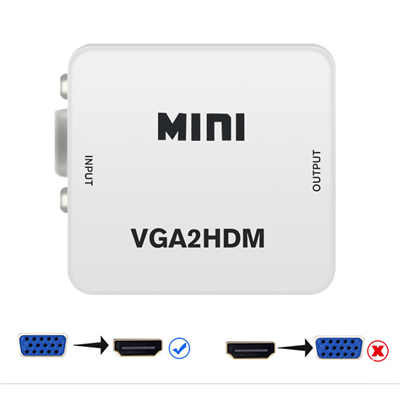
One point of confusion deserves special attention: VGA to HDMI converters and HDMI to VGA converters are not the same thing, and they are not interchangeable.
An HDMI to VGA converter (taking a digital HDMI signal and converting it to analog VGA) can often draw power from the HDMI port itself, as mentioned earlier. This is why many of those adapters do not have a USB power cable.
A VGA to HDMI converter (taking an analog VGA signal and converting it to digital HDMI) cannot reliably draw power from the VGA source, so it requires external USB power.
Always check the direction of your converter before purchasing. A VGA-to-HDMI adapter will typically have a USB power cable included; an HDMI-to-VGA adapter may not.
What About the Audio?
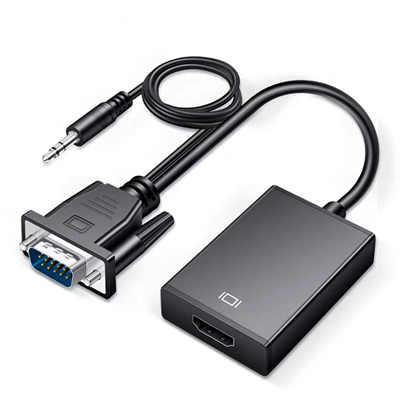
You might have noticed that many VGA to HDMI converters include a 3.5mm audio jack. This is because VGA carries no audio signal whatsoever—it is video-only. The converter needs to accept an analog audio input from your source device, digitize it, and embed it into the HDMI stream.
This audio processing adds to the computational load on the conversion chip, which in turn increases power requirements. Yet another reason the USB power connection is essential.
Practical Tips for Using Your Converter
-
Always connect the USB cable first before troubleshooting. As the Openterface documentation notes, “If you see a black screen, the most common reason is missing power”.
-
Use a reliable power source. A USB port on your computer or laptop works perfectly. USB wall chargers are also fine. Avoid underpowered ports like those on some keyboard hubs or unpowered USB splitters.
-
Check your resolution settings. Even with proper power, unsupported resolutions can cause blank or distorted screens. Most converters support up to 1920×1080 at 60Hz. Stick to standard resolutions like 1024×768, 1280×720, or 1920×1080.
-
Keep cables short. Longer cables can introduce signal degradation and interference, especially with analog VGA signals.
-
Remember the direction. These converters are unidirectional. A VGA-to-HDMI converter will not work in reverse.
Frequently Asked Questions
Q: Can I use my converter without plugging in the USB cable?
A: No. Without USB power, the internal conversion chip will not function, and your HDMI display will show a black screen.
Q: Can I plug the USB cable into any USB port?
A: Yes, any standard USB port that provides 5V power will work. This includes USB ports on your computer, laptop, or even a USB wall charger.
Q: Why do some HDMI to VGA adapters not need USB power?
A: HDMI carries a +5V power supply on pin 18, which can power the conversion electronics. VGA does not reliably provide this power, so VGA-to-HDMI converters need an external source.
Q: Is my converter broken if the screen flickers?
A: Not necessarily. Flickering is often caused by insufficient power, incorrect resolution settings, or a poor cable connection. Try a different USB port and verify your source device is outputting a supported resolution.
Q: How much power does a VGA to HDMI converter need?
A: Most converters draw between 1W and 2.5W at 5V DC. Some higher-end models may draw up to 5W.
Q: Can I use a power bank to power the converter?
A: Yes, as long as the power bank provides a stable 5V output. This can be a convenient solution for portable setups.
Final Thoughts
That little USB cable on your VGA to HDMI converter is not an afterthought or a design flaw—it is a necessity born from the fundamental incompatibility between analog and digital video standards. The conversion chip inside that adapter is doing real work, sampling analog voltages, digitizing them, and packaging them into a format your modern HDMI display can understand. All of that processing requires power, and since VGA was never designed to deliver it, USB steps in to fill the gap.
So the next time you connect your converter and see a black screen, check that USB cable first. Nine times out of ten, that is all it takes to get your picture back.
📖 Related Featured Articles

10 Ways to Use a VGA to HDMI Converter Bridging Analog-Digital Divide
Discover 10 practical ways to use a VGA to HDMI converter—from classrooms and conference rooms to di...

Can I connect VGA to HDMI without a converter? - WinFitin
Can you connect VGA to HDMI without a converter? We examine signal types, voltage differences, data ...

VGA to HDMI Adapter Shows Green Screen? Here‘s How to Fix It
Is your VGA-to-HDMI adapter showing a green screen? Learn why this happens and follow our 7-step tro...

VGA to HDMI Converter Not Working? 8 Proven Fixes for a Blank Screen
VGA to HDMI converter not working? Fix blank screens, no signal, and compatibility issues with these...