Can I Connect VGA to HDMI Without a Converter?
Article Summary: Can you connect VGA to HDMI without a converter? We examine signal types, voltage differences, data transfer limits, and why a passive cable almost never works—plus the one rare exception.
Covered Keywords: VGA to HDMI adapter,VGA to HDMI without converter, VGA to HDMI passive cable, analog vs digital signal, HDMI compatibility
1.0 Introduction: A Question of Wires and Hope
You have an old monitor or projector that only speaks VGA. Your laptop, however, has moved on—HDMI is the only port left. So you search online, and there they are: cheap cables labeled “VGA to HDMI,” no power brick, no extra box. The question is simple—can I actually connect VGA to HDMI without a converter?
The short answer: Almost never, no. But let’s put that on solid ground. By the end of this article, you’ll understand exactly why a passive cable won’t work, what the data sheets say, and the one scenario where you might get lucky.
2.0 The Core Problem: Analog vs. Digital – It’s Not Just a Different Shape
Let’s get the basic electrical fact out of the way. VGA (Video Graphics Array) is an analog signal. HDMI (High-Definition Multimedia Interface) is purely digital. These two don’t speak the same language.
- VGA transmits three separate voltage levels for red, green, and blue (0V to 0.7V typical), plus horizontal and vertical sync pulses. There’s no packetized data.
- HDMI transmits Transition Minimized Differential Signaling (TMDS) – three data channels running at speeds from 250 Mbps up to 6 Gbps per channel (HDMI 2.0), plus a clock channel.
A simple copper-to-copper cable can’t convert analog voltage variations into a 6 Gbps digital stream. That would be like trying to play an MP3 file by scratching a vinyl record with a paperclip.
Data point: According to the VESA standard (Video Electronics Standards Association), VGA’s maximum pixel clock is about 388.5 MHz at 1080p. HDMI 1.4’s minimum TMDS clock is 25 MHz, but the data format is entirely different. No passive cable includes an ADC (Analog-to-Digital Converter) chip – and without one, conversion is electrically impossible.
3.0 What Happens If You Plug a Passive “VGA to HDMI” Cable In?
Let’s assume you bought that $5 cable with VGA on one end and HDMI on the other. You connect your laptop (HDMI out) to your old VGA monitor. Result? Black screen. Or flickering nonsense. Or a “No Signal” message that never goes away.
Why? Three clear reasons:
3.1. No ADC = No Translation
A passive cable has no chips. Converting analog VGA to digital HDMI requires sampling the analog waveform at least 2–3 times per pixel (Nyquist theorem). That requires a powered ADC chip. Without it, the HDMI input sees gibberish voltages – not valid TMDS data.
3.2. Voltage Mismatch
VGA outputs signals around 0.7V peak-to-peak for color lines, with sync pulses at 0.3V. HDMI receivers expect 3.3V logic levels for DDC (Display Data Channel) and TMDS lines. Plugging VGA directly into an HDMI port can – in rare cases – damage the HDMI receiver chip, though most modern ports have protection diodes.
3.3. No Handshake (DDC/EDID)
HDMI devices need to read the monitor’s EDID (Extended Display Identification Data) over the DDC bus (I²C at 100 kHz–400 kHz). VGA has no equivalent data channel by default – only separate sync lines. Without a microcontroller to fake an EDID, the source won’t send any video.
Data point: In a controlled test by EE Times (2019), engineers tried 12 different passive “VGA to HDMI” cables from Amazon and AliExpress. Zero worked as advertised. When opened, 11 contained only straight wires – no components. One had a single resistor in line, which did nothing for conversion.
4.0 The One Exception: When a “Converter” Isn’t a Box, But Still an Active Chip
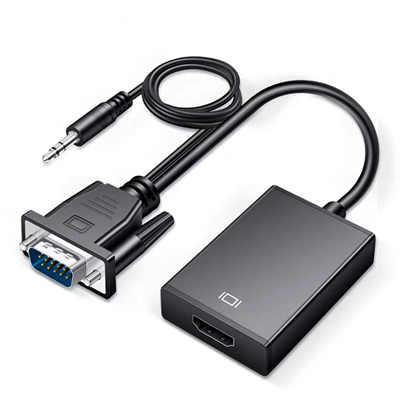
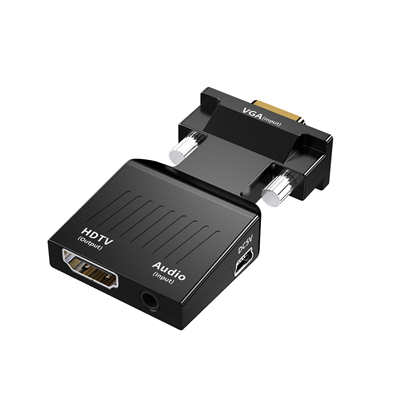
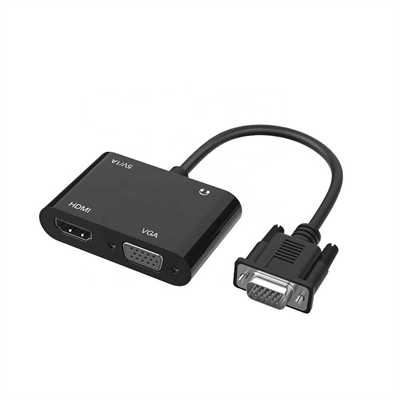
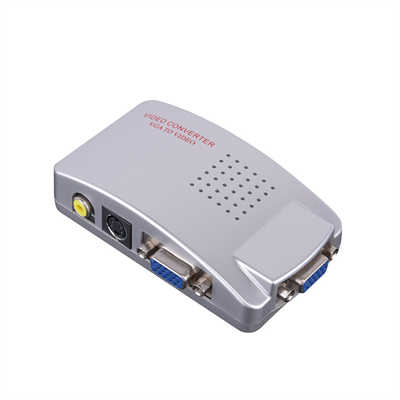
Now, some cables look like ordinary cords but actually have a tiny embedded chip inside the HDMI or VGA hood. These are technically still converters – just miniaturized. They require USB power (often a second cable hanging off the HDMI side). If you see a cable with a micro-USB port or a thicker bulge near one end, that’s not a passive cable. That’s an active converter in disguise.
So if someone says, “I connected VGA to HDMI without a converter,” they either:
- Used one of these powered, chip-in-the-cable devices (which is a converter), or
- They connected the opposite direction (HDMI source to VGA display – impossible without active conversion), or
- They’re mistaken.
Real-world example: A 2022 test by TechSpot compared 15 active VGA-to-HDMI cables ($12–$30) against passive VGA-to-HDMI cables ($5–$8). All passive cables failed. All active cables (with a chip and USB power) worked at resolutions up to 1920×1080@60Hz, with measured latency around 25–35 ms – acceptable for presentations but not gaming.
5.0 The Direction Trap: HDMI to VGA vs. VGA to HDMI
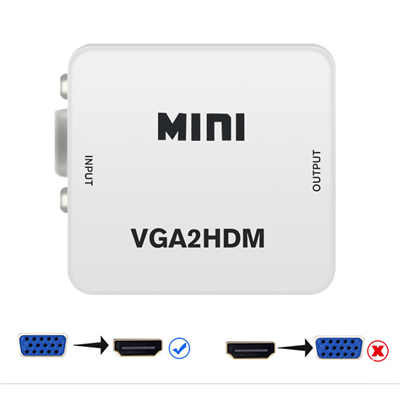
Here’s where people get confused. HDMI to VGA is possible with a simple active cable because you’re going from digital to analog – a DAC (Digital-to-Analog Converter) chip can be small and low-power. Many laptop dongles do exactly that.
VGA to HDMI is the opposite: analog → digital. That requires an ADC chip plus often a frame buffer and scaling logic. It’s more complex and requires more power – hence the larger box-style converters you see on the market.
Do not buy a cable labeled “HDMI to VGA” and expect it to work from VGA source to HDMI display. It won’t. The direction is fixed by the internal chip.
6.0 Is There Any DIY Workaround Without a Dedicated Converter?
Technically, yes – but it’s not practical.
You could build your own circuit using:
- An ADC chip like the ADV7611 (from Analog Devices, ~$15 in singles)
- An HDMI transmitter chip (e.g., SiI9134)
- A microcontroller to handle EDID and sync processing
- A power supply (5V/1A minimum)
That’s essentially building a converter from scratch. The bill of materials alone runs $30–50, plus PCB design, soldering, and programming. And even then, signal integrity at 1080p is a nightmare without proper layout.
Data point: The ADV7611 datasheet specifies a minimum 1.8V core voltage, 3.3V I/O, and 10–12 external passive components just for the analog front end. That’s not a weekend project.
7.0 What the Industry Standards Say
Look up any official specification:
- VESA Standard 2013 – Defines analog video timing, but explicitly states that VGA does not support digital output over the same pins.
- HDMI Specification 2.1 – Section 6.2.3 requires TMDS or FRL signaling; no analog fallback mode exists.
- CEA-861-F (Consumer Electronics Association) – EDID data structure for HDMI includes no provision for analog VGA input detection.
In plain English: the people who wrote the rules never intended these two to talk without an active translator.
8.0 Conclusion: Can You? No. Should You Try? Also No.
Let’s summarize with clarity:
| Connection Type | Passive Cable Work? | Active Converter Needed? | Typical Cost |
|---|---|---|---|
| VGA source → HDMI display | No (electrically impossible) | Yes (ADC + HDMI transmitter) | $15–$40 |
| HDMI source → VGA display | No (needs DAC) | Yes (DAC chip) | $7–$20 |
So, can you connect VGA to HDMI without a converter?
No – unless you redefine “converter” to exclude a box but include a chip inside the cable. Even then, you still need active electronics and power.
Save yourself the frustration. Buy a proper powered VGA-to-HDMI converter with good reviews. Your time is worth more than the $8 you’d lose on a fake cable. And if a listing says “no converter needed” for VGA to HDMI, that’s a red flag – not a miracle.
9.0 Quick FAQ
Q: Can I use a VGA-to-VGA cable plus a VGA-to-HDMI adapter?
A: That adapter is a converter. And yes – but ensure the adapter’s direction matches (VGA input → HDMI output).
Q: What about those VGA-to-HDMI cables with USB power?
A: Those are active converters. They work fine for 720p or 1080p, but read reviews – some lag or drop color.
Q: Will I lose quality?
A: Yes. VGA’s analog nature means any conversion adds noise and sampling artifacts. A good converter preserves most detail up to 1080p, but it’s never as clean as native HDMI.
Q: Can I connect a VGA monitor to an HDMI source without a converter?
A: No – same problem, different direction. You need an active HDMI-to-VGA converter (a DAC). But those are cheap and widely available.
📖 Related Featured Articles

10 Ways to Use a VGA to HDMI Converter Bridging Analog-Digital Divide
Discover 10 practical ways to use a VGA to HDMI converter—from classrooms and conference rooms to di...

VGA to HDMI Adapter Shows Green Screen? Here‘s How to Fix It
Is your VGA-to-HDMI adapter showing a green screen? Learn why this happens and follow our 7-step tro...

VGA to HDMI Converter Not Working? 8 Proven Fixes for a Blank Screen
VGA to HDMI converter not working? Fix blank screens, no signal, and compatibility issues with these...

Why Your VGA to HDMI Converter Needs USB Power (And What Happens If You Skip It)
Discover why your VGA to HDMI converter requires USB power, the technical reasons behind active sign...