10 Ways to Use a VGA to HDMI Converter Bridging Analog-Digital Divide
Introduction
There is something quietly frustrating about having a perfectly functional piece of technology become incompatible with everything around it. That is precisely where many people find themselves when they have an older computer, projector, or monitor that outputs VGA but needs to connect to a display that only accepts HDMI.
The Video Graphics Array (VGA) connector is a three-row, 15-pin D-subminiature connector that IBM introduced back in 1987. HDMI, by contrast, is an all-digital interface that transmits uncompressed video and digital audio. These two formats are not compatible at the hardware level, which means a simple passive adapter cable simply will not do the job.
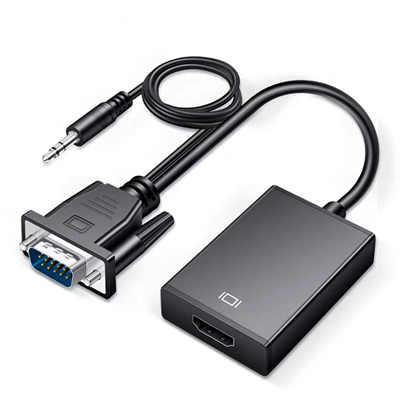
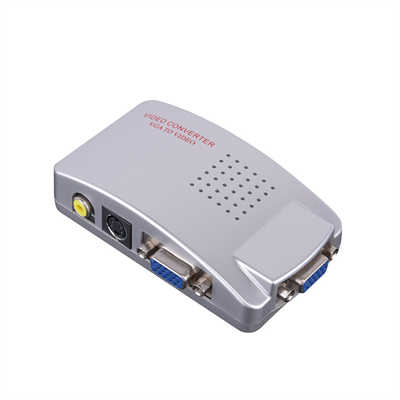
A VGA to HDMI converter is an active device that takes the analog video signal from a VGA source and converts it into a digital HDMI signal that a modern display can read and render. Most converters also handle audio separately, since VGA does not carry audio at all. The converter typically includes a small chipset that handles the analog-to-digital translation, and many units draw power through USB to keep that process running. Think of it as a real-time translator: it samples the analog VGA waveform, interprets timing and negotiates modes using display-identification data (EDID), and formats the result as HDMI output.
The global video adapter market was estimated at USD 1,571.98 million in 2024 and is projected to grow at a compound annual growth rate of 8.75%. Within this broader category, VGA converters remain a significant segment—not because VGA is new, but because so much legacy equipment still relies on it. IT departments and integrators continue to spend real time keeping older video sources useful, especially in training rooms, labs, and industrial stations that output only VGA.
So, what can you actually do with a VGA to HDMI converter? Here are ten practical ways to put one to work.
1. Connect an Older Desktop or Laptop to a Modern HDTV or Monitor
This is the most obvious use case, and it is also the most common. If you have an older desktop tower or a legacy laptop that only has a VGA output, you can connect it directly to a modern HDMI television or monitor. Simply plug the VGA end into the computer, connect the HDMI end to the display, attach the USB cable for power, and you are done.
Many of these converters support resolutions up to 1080p—some even reaching 1920 x 1200—which means you can get full HD quality from a machine that might otherwise be relegated to the recycling bin. For everyday tasks like browsing, document editing, or watching video, the visual performance is more than adequate.
What makes this particularly valuable is the cost equation. Instead of replacing a functional device just to get the right output format, you spend a fraction of the cost on a converter and keep the existing hardware in play. That is a meaningful difference for budget-conscious households and small businesses.
2. Drive a Conference Room or Meeting Room Display
Conference rooms are notorious for having mixed generations of equipment. The podium PC might be five years old with only a VGA port, while the wall-mounted display is brand new with HDMI inputs. A VGA to HDMI converter solves this problem instantly.
The converter is the perfect solution for a conference room or huddle space, providing a reliable connection between legacy presentation hardware and modern displays. Many professional-grade converters include built-in scalers that adjust the output signal to suit virtually any HDMI display, scaling the signal to resolutions up to 1080p. This means you can continue using your current source equipment while upgrading to a sleek new HDMI display.
Some converters also feature automatic resolution detection that minimizes setup time by avoiding tedious programming, plus an intuitive on-screen menu that lets you customize output parameters. For IT managers juggling multiple meeting spaces, this plug-and-play simplicity is a genuine time-saver.
3. Upgrade Classroom and Lecture Hall Projection
Schools and universities often have a mix of old and new technology. A classroom might have a reliable older desktop computer with VGA output and a newer projector that only accepts HDMI. VGA to HDMI converters are widely used in educational settings to bridge this gap.
Whether you are delivering a classroom presentation or updating a lecture hall setup, these converters provide a quick and reliable connection. They are ideal for quick demos, on-site events, or classrooms where time is precious. No driver installation, no complicated configuration—just plug it in and present.
The educational sector also benefits from the audio support that many converters offer. Since VGA does not carry audio, converters with a 3.5mm audio input allow you to combine sound from the source device with the video signal, so presentations can be both seen and heard on the connected HDMI display.
4. Enable Digital Signage from Legacy Hardware
Digital signage is everywhere—retail stores, corporate lobbies, healthcare waiting rooms, and trade show booths. But the computer driving the signage might be an older machine with only VGA output. A VGA to HDMI converter is ideal for integrating digital signage from an old PC to a new HD display.
The built-in scaler upgrades the VGA input signal, allowing you to display 720p or 1080p high-definition video in your digital signage setups using tried-and-true analog source equipment. Retail businesses and trade show exhibitors can capture an audience’s attention with HD content without investing in entirely new hardware.
The financial case here is particularly compelling. Organizations often want to buy one monitor class—HDMI-capable displays—while keeping older source equipment in service. A converter lets you standardize on modern displays without a forklift upgrade of every content source.
5. Modernize CCTV and Surveillance Monitoring
Security and surveillance systems often include DVRs and cameras that output VGA signals. When it is time to upgrade the monitoring displays to newer HDMI-enabled LCD screens, a VGA to HDMI converter provides a seamless transition.
These converters support a wide range of VGA input resolutions—from 640 x 480 up to 1920 x 1080 at 60Hz—making them fully compatible with various DVRs. They are a reliable and essential tool for CCTV and AV professionals needing to integrate legacy VGA-based systems with modern displays. Some converters are specifically designed for security and surveillance applications, featuring integrated scalers that display any video source at resolutions up to 1080p.
6. Support Healthcare and Medical Imaging Displays
Medical environments are another domain where legacy equipment meets modern displays. Healthcare facilities often have diagnostic machines, imaging systems, or patient monitoring stations that output VGA signals. Upgrading these systems can be prohibitively expensive, but connecting them to modern HDMI displays via a converter is a practical alternative.
Converters with antimicrobial protection are available for healthcare settings, making them ideal for medical imaging applications where hygiene is paramount. These devices deliver consistent signal transmission with minimal latency, which is critical in clinical environments. The VGA to HDMI converter is also great for scaling PC video for demanding healthcare, university lab, or graphics studio uses.
7. Connect Legacy Industrial and Manufacturing Equipment
Industrial automation systems, CNC machines, programmable logic controllers (PLCs), and human-machine interfaces (HMIs) often have VGA outputs. As factories and plants upgrade their monitoring displays to HDMI, VGA to HDMI converters provide a cost-effective way to keep these critical systems operational.
Industrial-grade converters typically use chipset solutions with broader compatibility, supporting a wider range of resolutions and refresh rates. In electromagnetic environments common in industrial settings, it is advisable to choose industrial-grade shielded VGA cables and converters with robust power delivery. Some professional-grade scan converters support up to 36 different resolutions, scaling from VGA analog signals to outputs as high as 1920 x 1200.
8. Set Up Home Theater and Media Centers
For home users, a VGA to HDMI converter can breathe new life into an older PC or laptop that you want to use as a media center. Connect that old machine to your big-screen HDTV and enjoy movies, streaming content, or even retro gaming.
Converters are recommended for home audio/video setups, media presentations, and digital signs. Some models support 2-channel stereo or even 5.1-channel surround sound, making them suitable for home theater applications. You can display a rich high-definition signal in your home theater setup using tried-and-true analog source equipment that might otherwise sit unused.
9. Connect Vintage Gaming Consoles to Modern Screens
Gaming is another area where VGA to HDMI converters find enthusiastic users. Vintage consoles like the PlayStation 3, Xbox 360, and even older systems that output VGA can be connected to modern HDMI displays.
These converters support high-quality video and audio output at a maximum resolution of 1080p at 60Hz. For retro gaming enthusiasts, this means being able to play classic titles on large modern screens without the blurriness or input lag that cheaper solutions might introduce. That said, because VGA is an analog signal, the conversion process does introduce some minor signal processing overhead. In most casual gaming environments this is imperceptible, but in latency-sensitive competitive gaming, it may not be ideal.
10. Enable IT Repair, Testing, and Diagnostics
IT professionals and repair technicians frequently encounter equipment with mismatched video ports. A VGA to HDMI converter is an essential tool in any technician’s kit.
When you are testing a legacy desktop, diagnosing a server with onboard VGA output, or verifying that an older graphics card still functions, a converter lets you connect that device to whatever HDMI display happens to be on the bench. Most converters are compact and lightweight—some weighing as little as 119 grams (4.2 ounces) and measuring just 89 x 29 x 68 mm. They fit easily into any laptop bag or toolkit. With plug-and-play functionality and no driver installation required, they are ready to use right out of the box.
Key Considerations When Choosing a VGA to HDMI Converter
Before you buy, there are a few things worth keeping in mind.
First, understand that it must be active. A passive “VGA to HDMI cable” is not a valid electrical translation. What you want is an adapter that contains an active conversion chip and a stable power source. Confirm the listing explicitly says “active” or “converter” and shows how it is powered—either via USB or an external supply.
Second, check the resolution support. Most consumer-grade converters support up to 1080p (1920 x 1080), while professional models can reach 1920 x 1200 (WUXGA). Some support a wide range of input resolutions including 640 x 480, 800 x 600, 1024 x 768, 1280 x 720, and 1280 x 1024.
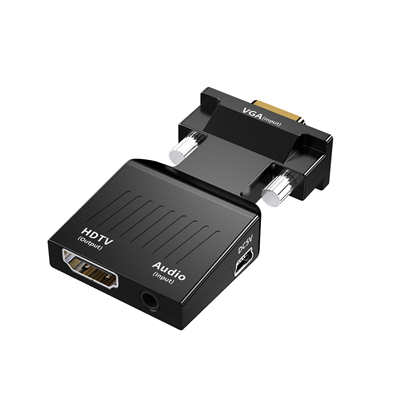
Third, consider audio. Since VGA does not carry audio, you will need a converter with a 3.5mm audio input if you want sound on the HDMI display. Higher-end models may also support optical audio inputs.
Fourth, think about power. Many portable adapters draw power via USB from the source device. Some higher-end converters use an external power supply for more stable operation with demanding timings. If you are using the converter in an industrial or professional setting, an external power supply is often the more reliable choice.
Frequently Asked Questions (FAQ)
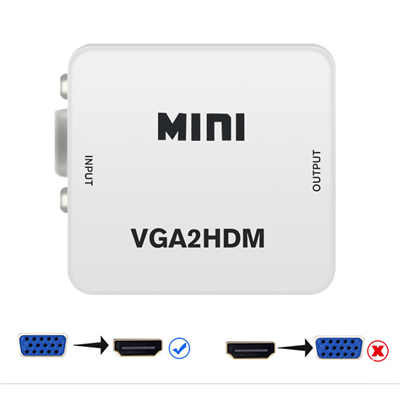
Q: Can I use a VGA to HDMI converter in reverse (HDMI to VGA)?
No. These converters are not bi-directional. They only convert VGA signal into HDMI signal. If you need to go the other direction, you will need an HDMI to VGA converter.
Q: Do I need to install drivers or software?
Generally, no. Most VGA to HDMI converters are plug-and-play and do not require any driver installation.
Q: What resolution can I expect?
Most converters support up to 1080p (1920 x 1080), with some professional models reaching 1920 x 1200. The actual output depends on both the converter and the source device.
Q: Why does the converter need power?
Because converting an analog VGA signal to digital HDMI requires active electronics—an analog-to-digital converter chip that needs power to operate. Most converters draw power via USB.
Q: Will this work with my Mac?
Yes. Most VGA to HDMI converters are compatible with both Windows and Mac operating systems.
Q: Can I use this for gaming?
Yes, for casual gaming and retro consoles. However, for competitive gaming where latency is critical, the analog-to-digital conversion may introduce minor processing overhead.
Final Thoughts
The VGA to HDMI converter is a small device that solves a surprisingly large problem. In a world where technology evolves rapidly, there is genuine value in keeping functional equipment in service rather than sending it to a landfill. Whether you are a teacher trying to connect a classroom projector, an IT professional modernizing a conference room, a healthcare worker upgrading medical displays, or simply a home user who wants to watch movies on an old laptop, a VGA to HDMI converter offers a simple, cost-effective solution.
The global market for video adapters continues to grow—estimated at USD 1.57 billion in 2024 and projected to expand at nearly 9% annually. That growth reflects a simple reality: the gap between legacy analog equipment and modern digital displays is not going away anytime soon. But with the right converter in hand, that gap becomes far less daunting.
📖 Related Featured Articles

VGA to HDMI Adapter Shows Green Screen? Here‘s How to Fix It
Is your VGA-to-HDMI adapter showing a green screen? Learn why this happens and follow our 7-step tro...

Can I connect VGA to HDMI without a converter? - WinFitin
Can you connect VGA to HDMI without a converter? We examine signal types, voltage differences, data ...

VGA to HDMI Converter Not Working? 8 Proven Fixes for a Blank Screen
VGA to HDMI converter not working? Fix blank screens, no signal, and compatibility issues with these...

Why Your VGA to HDMI Converter Needs USB Power (And What Happens If You Skip It)
Discover why your VGA to HDMI converter requires USB power, the technical reasons behind active sign...