IR vs. RS232 vs. IP Control: Choosing the Right HDMI Matrix for Your Needs
Abstract
Every HDMI matrix switcher supports at least one method for sending switching commands, but the three dominant options—IR, RS-232, and IP—serve very different installation scenarios. IR works for handheld control in a single room. RS-232 fits wired automation systems with tight cable runs. IP control puts switching on the network, enabling remote management, web interfaces, and scalability across buildings. This article breaks down the technical limits, real-world trade-offs, and market data behind each method so you can match the control interface to the deployment, not the other way around. It covers cable-length constraints, latency figures, cost implications, and the specific applications where each protocol makes the most sense.
Introduction
An HDMI matrix switcher routes multiple video sources to multiple displays. The routing capability is easy to compare—input count, output count, resolution support. What often gets overlooked until installation day is how commands actually reach the device. That is the control method, and it is independent of the matrix’s switching capacity. A 16x16 matrix can ship with only front-panel buttons, while a 4x4 unit may include IR, RS-232, and full TCP/IP control. The choice of control interface shapes where the matrix can be installed, who can operate it, and how it integrates with broader AV systems.
This article focuses on the three primary remote control methods: infrared (IR), RS-232 serial, and IP (Ethernet/TCP-IP). Front-panel buttons are useful as a local fallback but do not address remote operation or automation. For installations where the matrix will sit inside a rack, behind a display, or in a separate equipment room, one of these three protocols will determine the practical limits of the system.
IR Control: Simple, Local, Line-of-Sight Dependent
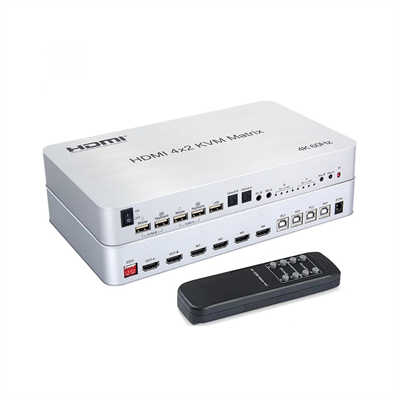
IR control is the most familiar method for consumer and light commercial AV gear. A handheld remote sends infrared pulses to a receiver on the matrix, and the matrix executes the command. It is inexpensive to implement, requires no configuration, and works well when the operator is in the same room as the equipment.
The limitations appear quickly in professional settings. IR is a line-of-sight technology. The receiver must remain visible to the remote. A cabinet door, a closed rack, or even a poorly angled shelf can block the signal and make switching unreliable. Extension hardware exists—IR receivers on cables and IR blasters that repeat signals—but each extension adds a point of failure and more cabling.
IR codes are also fixed at the factory. Two matrix units from the same product line may share the same code set, which creates conflicts in multi-matrix installations. If two 4x2 switchers sit in the same rack, a single remote may trigger both units simultaneously. One user review noted exactly this problem: “This product and the 4x2 use the same IR codes. Don’t plan on using them in the same rack for IR control”. There is no practical way to reprogram consumer-grade IR codes without manufacturer support.
IR suits home theaters, small conference rooms, and desktop setups where the matrix remains within arm’s reach of the operator and manual switching is the primary use case. It does not scale to multi-room distribution, automation presets, or installations where the equipment is hidden from view.
RS-232: Wired Reliability for Automation Systems
RS-232 is a serial communication standard that has been used in AV control for decades. In an HDMI matrix, an RS-232 port—typically a DB-9 connector or a 3-pin Phoenix terminal—allows a control processor, computer, or automation system to send ASCII commands directly to the matrix. The matrix executes the command and returns a status response, which makes the control loop deterministic and easy to debug.
The key advantage of RS-232 is reliability. Because it is a wired, point-to-point connection, there is no interference from other devices, no network congestion, and no line-of-sight requirement. Control systems from Crestron, AMX, Extron, and similar platforms have native RS-232 drivers for HDMI matrices, so integration is straightforward for an experienced programmer.
The physical limit is cable length. The RS-232 standard specifies a maximum cable length of approximately 50 feet (about 15 meters) when using typical cable, governed by a capacitance limit of 2,500 pF. Longer runs are possible with low-capacitance cable or lower baud rates, but these are engineering workarounds rather than guaranteed solutions. In practice, 50 feet covers most single-room and adjacent-room installations, such as a matrix in a rack feeding a control system in the same equipment closet or an adjacent control room.
Baud rate is another variable. Most HDMI matrices default to 9,600 bps, with 8 data bits, no parity, and 1 stop bit (8N1). Some models support higher rates—115,200 bps appears on certain Cypress and Ocean Matrix units—but 9,600 bps is sufficient for the short ASCII command strings used in matrix control. The command set is usually simple: a string specifying input, output, and sometimes a preset or EDID mode. For example, switching input 3 to output 5 might be a single line of ASCII text terminated by a carriage return.
RS-232 excels in conference rooms, classrooms, and control rooms where a dedicated control processor manages the AV system. It is less suited to large distributed installations because every matrix needs its own serial connection to the control system, and cable runs become impractical beyond the 50-foot threshold.
IP Control: Network-Based Management and Scalability
IP control moves matrix commands onto the Ethernet network. The matrix exposes a network interface—usually an RJ-45 port—and accepts commands via Telnet, a web GUI, or a REST-style HTTP API. A control system, a computer, or even a mobile device on the same network can send switching commands without a direct physical connection to the matrix.
The range limitation disappears. As long as the matrix and the controlling device are on the same network, the physical distance between them is irrelevant. A matrix in a basement rack can be controlled from an office on the third floor. Over a VPN or a routed network, control can extend across buildings or campuses. This is the fundamental advantage of IP control: it decouples the control path from the video path and from physical proximity.
Integration with third-party systems is another strength. IP control allows a matrix to be addressed by network-based control platforms, building management systems, and even simple scripts running on a server. The KVMSwitchTech 8x16 matrix, for example, supports RS-232, Telnet, and Web GUI control, and its IP interface allows “additional options for integration of third-party control systems”. That flexibility matters in environments where the AV system is one component of a larger technology stack.
Latency is a consideration in IP-based video distribution, but not in IP-based control. Sending a switching command over a network takes milliseconds. The latency figures that appear in AV-over-IP discussions—typically 23 ms for low-latency 4K codecs, 70–180 ms for some multiviewer receivers, and under 4 ms for certain KVM-over-IP solutions—refer to video encoding and decoding, not to the control channel. Control commands are small packets and travel through the network without the processing overhead of video compression.
The trade-off is network dependency. IP control requires a functioning network, proper IP configuration, and awareness of network security. A matrix on a flat, unmanaged network with default credentials is a potential vulnerability. In managed installations, the AV network is often segmented from the corporate data network, which adds design and configuration effort but also improves security and reliability.
IP control is the right choice for multi-room distribution, large matrices (16x16 and above), remote management scenarios, and any installation where the matrix will be accessed from more than one physical location. It is also the only control method that scales without adding physical cable runs to the control system.
Side-by-Side Comparison
The table below summarizes the practical differences across the three control methods. The comparison focuses on installation constraints and operational characteristics rather than theoretical specifications.
| Criterion | IR | RS-232 | IP |
|---|---|---|---|
| Connection type | Wireless (infrared) | Wired serial (DB-9 or Phoenix) | Wired Ethernet (RJ-45) |
| Maximum control distance | Limited by line-of-sight; typically same room | ~50 ft (15 m) standard | Limited only by network topology |
| Line-of-sight required | Yes | No | No |
| Configuration complexity | Very low | Moderate (baud rate, command set) | Moderate to high (IP, network, security) |
| Multi-device interference | Possible if code sets overlap | None (point-to-point) | None (unique IP addressing) |
| Automation system integration | Rare (via IR blasters) | Native on most control platforms | Native on most control platforms; API access |
| Remote management | No | No (unless extended) | Yes (web GUI, Telnet, API) |
| Scalability | Low | Low to moderate | High |
| Typical use case | Single room, handheld control | Control processor in same rack/room | Multi-room, distributed, remote management |
The table makes one pattern clear: IR is the simplest to deploy and the most constrained in operation. RS-232 sits in the middle—more reliable than IR, but bounded by cable length. IP removes the distance constraint and enables remote management, but requires network design and security consideration.
How to Choose: Matching Control to Installation
The decision should follow the physical reality of the installation, not a preference for one protocol over another. Start with where the matrix will sit and who needs to operate it.
If the matrix is in the same room as the operator and switching is a manual, occasional task, IR is sufficient. A home theater with a matrix on a shelf and a single remote on the coffee table does not need RS-232 or IP. The cost and complexity of those methods would not improve the user experience.
If the matrix is in a rack or a closet and a control processor manages the AV system, RS-232 is the natural fit. The 50-foot limit is rarely a problem when the matrix and the control system share an equipment rack or occupy adjacent rooms. The deterministic nature of serial communication also simplifies troubleshooting: if a command does not execute, the problem is in the cable, the baud rate, or the command string—not in network configuration.
If the matrix is part of a larger distribution system, if it will be managed remotely, or if the control system is already network-based, IP control is the appropriate choice. The 2025 global AV-over-IP market was projected at approximately $18.1 billion, with a forecast reaching $694.3 billion by 2033—a compound annual growth rate of 57.76%. That growth reflects a broader industry shift toward network-based AV architectures. A matrix that supports IP control is positioned to integrate with that infrastructure; one that does not will eventually become an island.
Cost also plays a role, though it is not as straightforward as a per-protocol comparison. HDMI matrix switchers as a category are a mature, cost-competitive market. The 2025 global market for HDMI matrix splitters was valued at roughly $85.75 million, with a projected CAGR of 3.1% through 2032. Individual matrix units range from a few hundred dollars for a 4x2 consumer model to several thousand for a 16x16 commercial unit with redundant power supplies and modular I/O. The control method is a feature of the matrix, not a separate purchase, so the cost question is really about which matrix to buy—and a matrix with IP control typically costs more than an equivalent unit with only IR. The premium buys remote management and scalability, which are worth paying for only if the installation requires them.
One practical approach is to buy a matrix that supports multiple control methods. Many professional matrices include IR, RS-232, and IP in the same chassis. This provides a local IR fallback for emergency operation, an RS-232 path for a dedicated control processor, and an IP interface for remote management. The Aurora Multimedia ASP-44-4K, for example, includes a front keypad, RS-232, and LAN control with built-in web pages. Redundancy in control methods is not over-engineering; it is a hedge against the failure of any single path.
Conclusion
The choice between IR, RS-232, and IP control is a question of installation constraints, not technical superiority. IR is the simplest option and remains appropriate for single-room, line-of-sight operation. RS-232 provides wired reliability within the 50-foot envelope of serial communication and integrates cleanly with traditional control systems. IP control removes distance limitations and enables remote management, making it the default choice for distributed and network-managed installations.
The most important step is to decide the control method before selecting the matrix. A matrix that fits the physical installation and the control architecture will last longer and cause fewer headaches than one chosen on input/output count alone. If there is any uncertainty about future requirements, choose a matrix that supports all three methods. The incremental cost is modest compared with the cost of replacing a matrix that cannot be controlled the way the installation demands.
FAQ
What is the maximum cable length for RS-232 control of an HDMI matrix?
The RS-232 standard specifies a maximum cable length of approximately 50 feet (about 15 meters) with typical cable, limited by a capacitance of 2,500 pF. Longer runs are possible with low-capacitance cable or reduced baud rates, but 50 feet is the practical design threshold for most installations.
Does IP control add latency to HDMI matrix switching?
No. IP control commands are small network packets and execute in milliseconds. The latency figures commonly cited for AV-over-IP—typically 23 ms for low-latency 4K codecs and under 4 ms for certain KVM-over-IP solutions—apply to video encoding and decoding, not to the control channel.
Can I use IR and RS-232 control on the same HDMI matrix?
Many professional matrices support multiple control methods simultaneously. A unit may include an IR receiver, an RS-232 port, and an IP interface in the same chassis. This allows IR as a local fallback, RS-232 for a control processor, and IP for remote management, providing redundancy in the control path.
Why do IR remotes sometimes control multiple HDMI matrices at once?
IR codes are often shared across product lines from the same manufacturer. If two matrix units use the same code set and sit within range of the same remote, a single button press can trigger both devices. One user review of a 4x2 and 4x4 matrix from the same brand noted exactly this conflict: “This product and the 4x2 use the same IR codes. Don’t plan on using them in the same rack for IR control”.
When should I choose IP control over RS-232 for an HDMI matrix?
Choose IP control when the matrix needs to be managed from a different room or building, when the control system is already network-based, or when the installation is expected to scale beyond a single matrix. RS-232 is sufficient when the matrix and the control processor share the same rack or adjacent rooms and cable runs stay within 50 feet.
📖 Related Featured Articles

Using a 2x2 HDMI Matrix for Dual Monitor Productivity: A Practical Guide
Learn how a 2x2 HDMI matrix switch can streamline your dual monitor workflow. Covers productivity da...

How to Set Up a 4x4 HDMI Matrix for a Home Automation System
Learn how to set up a 4x4 HDMI matrix for your home automation system. This guide covers hardware se...

HDMI Matrix for Art Installations and Museums: A Complete Technical Guide
How museums and art installations use HDMI matrix switchers for 4K video distribution, video walls, ...

What Is an HDMI Matrix? The Ultimate Flexibility for Multi-Screen Setups
A complete guide to HDMI matrix switchers: how they work, how they differ from splitters and switche...