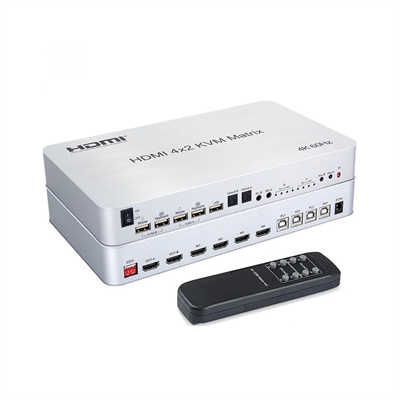
What Is an HDMI Matrix? The Ultimate Flexibility for Multi-Screen Setups
Summary / Abstract
An HDMI matrix switcher is a central routing platform that allows multiple HDMI sources—such as media players, computers, gaming consoles, and cameras—to be independently routed to multiple displays. Unlike a simple HDMI switch or splitter, a matrix lets each screen receive a different source at the same time, which is why it has become indispensable in conference rooms, control centers, home theaters, digital signage networks, and live production environments. This article explains how an HDMI matrix works, how it differs from related devices, what specifications matter in 2026 (HDMI 2.1, 8K, HDCP 2.3, EDID management, HDBaseT), and how to choose the right model for your setup. It also examines market data showing sustained global growth and addresses common questions about compatibility, bandwidth, and cost.
If you have ever tried to manage a room with several screens and more than one video source—say, a conference hall with a laptop, a media player, and a video conferencing codec feeding a projector and two wall-mounted displays—you already know the frustration. Cable swaps, extra hardware, and a separate switch for every display quickly turn into a daily headache. An HDMI matrix exists precisely to solve that problem.
What an HDMI Matrix Actually Does
An HDMI matrix switcher accepts multiple HDMI sources and independently routes any source to any display. The word “independently” is the key. Each output can receive a different input, and one source can simultaneously feed several outputs at once. An 8×8 matrix, for example, has eight inputs and eight outputs, meaning eight sources can be routed to eight screens in any combination you choose.
This is fundamentally different from a standard HDMI switch, which takes several inputs and sends only the selected one to a single display. It is also different from an HDMI splitter, which duplicates one source across multiple screens without any routing flexibility. A matrix combines the functions of both: it switches and it splits, but it does so with independent control over every output path.
HDMI Matrix vs. Splitter vs. Switch: Clearing Up the Confusion
| Device | Inputs | Outputs | Routing Flexibility |
|---|---|---|---|
| HDMI Switch | Multiple | One | Select one source for one display |
| HDMI Splitter | One | Multiple | Mirror one source to all displays |
| HDMI Matrix | Multiple | Multiple | Any source to any display, independently |
The practical difference shows up immediately in real installations. A conference room that needs to send a presenter’s laptop to the main projector while displaying a welcome slide on the lobby screen and a live camera feed on a confidence monitor requires a matrix, not a switch or a splitter. As BZBGEAR’s technical team puts it, an HDMI matrix gives installers one place to route signals, helps operators switch sources quickly, and keeps the path organized as the room grows.
Market Growth: Why This Category Keeps Expanding
The global HDMI matrix splitter market was valued at approximately US$ 1.24 billion in 2025 and is projected to reach US$ 1.75 billion by 2032, growing at a compound annual growth rate of around 5.0% during that period. In 2025 alone, global sales volume reached roughly 323,000 units, with mainstream models averaging around US$ 3,740 per unit and gross margins ranging from 27% to 35%.
That growth is not driven by hobbyists alone. Enterprise digital transformation, the normalization of hybrid work, and online education have pushed small and mid-sized meeting rooms and classrooms to upgrade from “single projector plus a simple switcher” to multi-source environments that incorporate remote conferencing, recording, and streaming. Meanwhile, government and public-sector control centers—emergency platforms, transportation monitoring, energy grid oversight—increasingly depend on centralized multi-signal viewing and flexible routing, which sustains demand for larger matrix platforms.
Interestingly, AV-over-IP solutions have begun to compete with traditional hardware matrices in some new construction projects. But HDMI matrices retain a strong advantage in scenarios where low latency, deterministic behavior, and plug-and-play reliability matter more than network scalability. The market is evolving toward a split: high-end projects moving toward networked and platform-based solutions, while mid-range and small projects benefit from improved integration and cost optimization in standalone matrix units.
Key Specifications That Actually Matter
HDMI 2.1 and Bandwidth
The current standard for premium matrices is HDMI 2.1, which supports data rates up to 48 Gbps. In practice, many professional-grade matrices on the market operate at 40 Gbps, which is sufficient for 8K at 60 Hz with 4:2:0 chroma subsampling and 4K at 120 Hz with full 4:4:4 color. For gaming setups and high-frame-rate sports content, 4K at 120 Hz with VRR (Variable Refresh Rate) and ALLM (Auto Low Latency Mode) pass-through has become a baseline expectation for any matrix purchased in 2026.
A word of caution: not every product labeled “4K60” actually handles 4K at 60 Hz with 4:4:4 chroma sampling at 18 Gbps. Some matrices silently drop to 4:2:0, which reduces color detail noticeably on large screens. When specifying a matrix, verify that the entire signal chain—source, matrix, cable or HDBaseT link, and display—actually supports the bandwidth you need.
HDCP 2.3 and Compatibility
HDCP 2.3 is the current content protection standard for 4K and 8K streaming services and disc-based content. A matrix that lacks proper HDCP 2.3 handling will simply refuse to pass protected content to a display, often resulting in a black screen with no obvious explanation. Real-world reports show that firmware inconsistencies can cause specific devices—particularly game consoles with strict HDCP implementations—to fail handshaking even when the matrix claims compliance.
This is not a trivial issue. If you are routing content from a streaming stick, a 4K Blu-ray player, or a cable box, HDCP compliance is not optional. It is the difference between a working system and a very expensive black screen.
EDID Management
EDID (Extended Display Identification Data) management is arguably the most underappreciated feature in any matrix. EDID is how a display tells a source what resolutions, refresh rates, and audio formats it can accept. In a matrix environment with multiple displays of different capabilities—a 1080p lobby screen alongside a 4K HDR main display, for instance—the matrix must manage conflicting EDID information so that sources do not default to the lowest common denominator or, worse, refuse to output anything at all.
Mixed native resolutions on the wall are the most common cause of black screens after a source swap. A well-designed matrix offers selectable EDID modes: pass-through, copy from a specific output, or a fixed EDID table that stabilizes the source. Without this, even a technically capable matrix can become unreliable in daily use.
HDBaseT and Long-Distance Distribution
HDMI copper cables are practical up to about 5 meters for high-bandwidth signals. Beyond that, signal degradation becomes a real concern. HDBaseT technology solves this by carrying uncompressed 4K at 60 Hz with 4:4:4 chroma sampling up to 100 meters (328 feet) over a single Cat6a cable. Many professional matrices offer a mix of native HDMI outputs and HDBaseT outputs, allowing installers to use short HDMI runs for nearby displays and HDBaseT for screens across a large room or building.
Where HDMI Matrices Are Used
Home Theater
A home theater with a 4K projector, a gaming console, a streaming device, and a media server benefits enormously from a matrix. Instead of unplugging cables or adding a separate switch for each device, the user can route any source to the projector, a secondary TV, or both. For gamers, HDMI 2.1 matrices that support 4K at 120 Hz and VRR are particularly attractive, though it is worth noting that every device in the chain—console, matrix, and display—must support these features for them to work.
Conference Rooms and Corporate AV
This is where matrices earn their keep. A typical mid-sized conference room might have a laptop connection, a wireless presentation gateway, a video conferencing codec, and a document camera as inputs, feeding a main display, a confidence monitor, and a recording system. A matrix lets the AV operator route any source to any destination without touching a cable. Integration with control systems like Crestron or AMX via RS-232 or TCP/IP is standard in this segment.
Control Rooms and Command Centers
In security operations centers, network operations centers, and broadcast galleries, reliability is not a convenience—it is a requirement. An 8×8 or 16×16 matrix in these environments must maintain signal integrity through handshake failures, cable issues, and decoder reboots. Features like input-priority failover, dual power supplies, and documented fallback sources are specified into the bill of materials rather than treated as afterthoughts.
Digital Signage and Video Walls
Retail stores, airports, hotels, and sports venues use matrices to distribute promotional content, wayfinding information, and live feeds across multiple screens. A 16×16 matrix with video wall functionality can split a single image across multiple displays or route different content to different zones, all from one chassis.
How to Choose the Right HDMI Matrix
Count Your Sources and Displays Separately
You do not need a square matrix. If you have six sources and four displays, a 6×4 or 8×4 unit may be sufficient and more cost-effective than an 8×8. The key is to count current needs and add headroom for planned expansion. A 16×16 chassis is often the default in control rooms where spare inputs are reserved for backup encoders, test pattern generators, and legal-hold recorders.
Match the Video Format to Your Content
If your sources and displays are 1080p, an HDMI 1.4 matrix may still work, though availability is declining. For 4K at 60 Hz with HDR, you need at least HDMI 2.0 with 18 Gbps. For 4K at 120 Hz gaming or 8K content, HDMI 2.1 with 40–48 Gbps is the target. Buying an 8K-capable matrix in 2026 is a reasonable hedge if you plan to keep the installation for five or more years and do not want to rip and replace when 8K displays become mainstream.
Consider Modular vs. Fixed
Fixed-port matrices are simpler and usually less expensive. Modular chassis matrices allow you to swap input and output cards as needs change, which can extend the useful life of the platform significantly. For installations where the room configuration is likely to evolve—a growing conference center, for example—modular architecture often pays for itself in avoided replacement costs.
Do Not Ignore Audio
Many matrices support audio de-embedding, which extracts audio from the HDMI signal and outputs it via analog, coaxial, or optical connections to a separate audio system. This is particularly useful in conference rooms where the display’s built-in speakers are inadequate and a dedicated sound system is in place. ARC (Audio Return Channel) support allows audio from a display’s built-in apps to be sent back through the matrix to an amplifier, though ARC compatibility issues between different brands are common and should be tested before committing to a design.
Frequently Asked Questions
What is the difference between an HDMI matrix and an HDMI splitter?
A splitter takes one source and mirrors it to multiple displays. A matrix takes multiple sources and routes any source to any display independently. If you need different content on different screens at the same time, you need a matrix.
Can an HDMI matrix handle 4K at 120 Hz?
Yes, but only if the matrix supports HDMI 2.1 with sufficient bandwidth (40 Gbps or higher). The source device, the matrix, all cables, and the display must all support 4K at 120 Hz for it to work end to end.
Do I need HDCP 2.3 support?
If you are routing any protected content—streaming services, 4K Blu-ray discs, or cable TV—you need HDCP 2.3 compliance. Without it, the matrix will not pass the signal, and you will see a blank screen.
How far can an HDMI matrix send a signal?
Native HDMI outputs are typically reliable up to about 5 meters for high-bandwidth signals. HDBaseT outputs can extend the signal up to 100 meters over Cat6a cable without compression.
Is an HDMI matrix worth the cost?
For single-screen setups with one or two sources, a simple switch is sufficient. For any environment with multiple displays and multiple sources that need independent routing, a matrix eliminates cable swaps, reduces equipment clutter, and provides centralized control that pays for itself in reliability and time savings.
📖 Related Featured Articles

Using a 2x2 HDMI Matrix for Dual Monitor Productivity: A Practical Guide
Learn how a 2x2 HDMI matrix switch can streamline your dual monitor workflow. Covers productivity da...

How to Set Up a 4x4 HDMI Matrix for a Home Automation System
Learn how to set up a 4x4 HDMI matrix for your home automation system. This guide covers hardware se...

HDMI Matrix for Art Installations and Museums: A Complete Technical Guide
How museums and art installations use HDMI matrix switchers for 4K video distribution, video walls, ...

HDMI Matrix with HDBaseT: A Complete Guide to Extending AV Signals Over Long Distances
Learn how HDMI matrix switchers with HDBaseT extend uncompressed 4K AV signals up to 100m over Cat6 ...