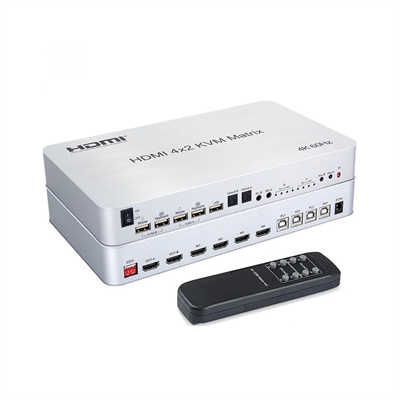
HDMI Matrix with HDBaseT: A Complete Guide to Extending AV Signals Over Long Distances
HDMI Matrix with HDBaseT: How to Extend 4K AV Signals Over 100 Meters
Abstract
Standard HDMI cables begin to degrade beyond 15 feet, which makes multi-room or multi-zone AV distribution a real headache. This guide explains how HDMI matrix switchers with integrated HDBaseT technology solve that problem by transmitting uncompressed 4K video, audio, Ethernet, control signals, and power over a single Category cable for distances up to 100 meters. We cover the technical specifications across HDBaseT versions, real-world distance limits for 1080p and 4K, market trends, selection criteria, and installation best practices.
Introduction
Anyone who has tried to run an HDMI cable across a large home or commercial space knows the problem. Passive HDMI cables typically lose signal integrity beyond 15 feet, and even active copper cables struggle past 50 feet without some form of signal correction. For system integrators dealing with multi-room setups, conference centers, or digital signage networks, this physical limitation is not just an inconvenience. It is a fundamental design constraint that shapes every cabling decision.
HDBaseT changes that equation. Developed by the HDBaseT Alliance and introduced in 2010, this technology allows uncompressed ultra-high-definition audio and video to travel up to 100 meters (328 feet) over a single standard Category cable — with zero latency. When you pair HDBaseT outputs with an HDMI matrix switcher, you get the ability to route any source to any display, across any distance the cable can reach, all through one integrated device.
This article breaks down what that combination actually delivers, how the technology has evolved, and what you should consider before specifying a system.
What Is an HDMI Matrix Switcher?
An HDMI matrix switcher takes multiple HDMI inputs and routes them independently to multiple outputs. Unlike a splitter, which sends one source to many displays, a matrix lets you send Source 1 to Display 3 while Source 2 goes to Displays 1 and 4 — simultaneously. That any-to-any flexibility is the defining feature, and it is what separates a matrix from a basic switch.
Matrix switchers are labeled by their input and output counts. A 4x4 has four inputs and four outputs. An 8x8 has eight of each. Common configurations include 4x4, 8x8, and 16x16, with modular chassis options available for larger installations where future expansion is a concern.
On their own, HDMI matrix switchers are limited by the same cable-length constraints as any HDMI connection. That is where HDBaseT comes in.
What Is HDBaseT Technology?
HDBaseT is a standardized connectivity technology built around what the HDBaseT Alliance calls the “5Play” feature set. A single Category cable carries five distinct signal types simultaneously:
- Uncompressed HDMI audio and video — no compression artifacts, no latency
- 100 Mbps Ethernet (Gigabit with HDBaseT 3.0)
- Control signals — RS-232 and IR for device management
- USB 2.0 (added in Spec 2.0)
- Power — up to 100W over the same cable
The practical significance of this convergence cannot be overstated. Instead of running separate cables for video, network, control, and power to each display location, you run one Cat cable. The technology uses an advanced modulation scheme to achieve this without compressing the video signal, which means the image quality at the receiving end is identical to the source.
Because HDBaseT is a standard rather than a proprietary protocol, devices from different manufacturers can interoperate. Any two HDBaseT-supported devices will negotiate to their highest shared feature set, which gives integrators more flexibility in product selection.
How HDBaseT Solves the Distance Problem
The core value of pairing HDBaseT with an HDMI matrix is straightforward: it extends the usable distance of an HDMI signal from a few feet to over 300 feet.
The HDBaseT Alliance’s original Spec 1.0 supports 1080p up to 100 meters over Cat5e or higher, and 4K up to 70 meters over Cat5e (or 100 meters with select Cat6a cable). Spec 2.0, released in 2013, extended 4K@30 4:4:4 to 100 meters over Cat6 and added USB 2.0 support. Spec 3.0, which debuted in 2019, doubled the uncompressed data rate to 16 Gbps, enabling fully uncompressed 4K@60Hz 4:4:4 over 100 meters — a first for the industry — and upgraded Ethernet from 100 Mbps to full-duplex Gigabit.
For a matrix switcher, this means each HDBaseT output port can drive a display or receiver up to those distances. A 4x4 HDBaseT matrix, for instance, can send four independent sources to four locations throughout a building, each up to 100 meters away, using nothing more exotic than Cat6 cable.
Distance and Bandwidth Specifications at a Glance
The table below summarizes the key distance and bandwidth figures across HDBaseT versions, as specified by the HDBaseT Alliance and corroborated by product documentation from major manufacturers.
| Specification | HDBaseT 1.0 | HDBaseT 2.0 | HDBaseT 3.0 |
|---|---|---|---|
| 1080p distance | 100m over Cat5e+ | 100m over Cat5e+ | 100m over Cat6a |
| 4K@30 4:4:4 | 70m over Cat5e | 100m over Cat6 | 100m over Cat6a |
| 4K@60 4:4:4 | Not supported uncompressed | Not supported uncompressed | 100m over Cat6a |
| Max bandwidth | 10.2 Gbps | 10.2 Gbps | 16 Gbps (18 Gbps HDMI) |
| Ethernet | 100 Mbps | 100 Mbps | 1 Gbps full-duplex |
| USB support | No | USB 2.0 | USB 2.0 |
| Power over cable | Up to 100W | Up to 100W | Up to 100W |
It is worth noting that many current-generation matrix switchers support 18 Gbps HDMI bandwidth on the HDMI side while using HDBaseT outputs that operate at lower effective rates, often with techniques like Display Stream Compression to maintain 4K@60 4:4:4 quality over distance. For example, the Atlona Opus Series delivers 4K/60 4:4:4 with HDR over HDBaseT up to 100 meters using visually lossless DSC.
Actual achievable distances depend heavily on cable quality. Poorly terminated RJ45 connectors, patch panels, and wall plates all introduce potential failure points. Best practice is to use a single continuous cable run from the matrix output to the receiver, and to test every run before commissioning.
Market Context: Where HDBaseT Fits in 2026
The AV extension market is growing at a healthy clip. The global extenders market — which includes HDBaseT, AV over IP, and fiber-based solutions — is projected to reach between $2.1 billion and $3.4 billion by 2026, expanding at a compound annual growth rate of 8.8% to 11.5% through 2031. The broader AV distribution system market, valued at $5.67 billion in 2025, is expected to reach $10.2 billion by 2035 at a CAGR of approximately 6%.
HDBaseT is not the fastest-growing segment within that market. AV over IP is expanding at a far more aggressive rate, driven by enterprise-scale deployments and the advantages of standard network infrastructure. However, HDBaseT inputs declined by only 6% year-over-year in recent data, which underscores its continued importance in hybrid environments where low latency and deterministic performance matter more than infinite scalability.
The practical takeaway for system designers is this: HDBaseT remains the pragmatic choice for self-contained installations with fixed layouts — a home, a conference center, a restaurant with multiple zones — where simplicity and zero latency are priorities. AV over IP makes more sense when the system needs to scale across a campus or integrate with existing IT networks.
Key Considerations When Selecting an HDMI Matrix with HDBaseT
Port Count and Future Growth
Count your sources and displays separately. You do not need a square matrix. If you have six sources and four displays, an 8x8 gives you headroom on both sides, but a dedicated 6x4 may be cheaper if available. Fixed matrices cannot add ports later, so buying one size up is often far cheaper than replacing the entire unit in 18 months.
Resolution and Bandwidth Requirements
If your installation involves 4K@60Hz 4:4:4 content — and in 2026, it likely does — you need a matrix that supports 18 Gbps HDMI bandwidth on the input side and an HDBaseT output capable of handling that data rate over distance. HDBaseT 3.0 is the only version that does this natively without compression. Some manufacturers achieve similar results with DSC, which is visually lossless but worth verifying against your content requirements.
Cable Type
Cat5e is the minimum for HDBaseT, but Cat6 is recommended for runs over 30 meters or for 4K content. For HDBaseT 3.0 and full uncompressed 4K@60 4:4:4 over 100 meters, Cat6a U/FTP is the recommended cable type. Shielding matters: alien crosstalk from adjacent cables can degrade HDBaseT signals, and shielded or foil-twisted pair cable eliminates that risk.
Control and Integration
A good HDBaseT matrix should support multiple control methods: front-panel buttons, IR remote, RS-232, TCP/IP, and web GUI. Advanced EDID management is essential for compatibility with mixed display types. Bi-directional IR matrix routing allows you to control sources from display locations and vice versa, which is particularly useful in distributed systems.
Power over Cable
Many HDBaseT receivers can be powered directly from the matrix over the Cat cable, eliminating the need for a power outlet at each display location. This is not just a convenience — it reduces installation cost and failure points. Verify that your chosen matrix supports PoC (Power over Cable) or PoH (Power over HDBaseT) on all output ports.
Applications: Where This Technology Shines
Residential multi-room AV. A whole-house system with a central equipment rack and displays in the living room, bedrooms, kitchen, and outdoor patio is a textbook HDBaseT matrix application. One 8x8 matrix can route cable boxes, streaming devices, and gaming consoles to any room on demand.
Corporate and education. Conference rooms, lecture halls, and training centers often need to route multiple sources — laptops, document cameras, media players — to projectors and displays across a floor or building. HDBaseT matrix switchers handle this without requiring a network infrastructure overhaul.
Hospitality and retail. Bars, restaurants, and hotels use HDBaseT matrices to distribute satellite feeds, digital signage, and promotional content to multiple zones. The ability to switch sources independently per zone is particularly valuable in hospitality environments.
Control rooms and command centers. Where operators need to monitor multiple feeds on multiple displays with zero latency, HDBaseT matrices provide deterministic routing without the variable latency that packet-based AV over IP systems can introduce.
FAQ
How far can HDBaseT transmit 4K video?
With HDBaseT 1.0, 4K is limited to 70 meters over Cat5e or 100 meters over select Cat6a. HDBaseT 2.0 extends 4K@30 4:4:4 to 100 meters over Cat6. HDBaseT 3.0 supports uncompressed 4K@60 4:4:4 up to 100 meters over Cat6a. Actual distances depend on cable quality and termination.
Does HDBaseT introduce latency?
No. HDBaseT transmits uncompressed video, so there is no encoding or decoding delay. The technology is specified as zero-latency, which makes it suitable for live events, control rooms, and interactive applications where even a few milliseconds of delay would be noticeable.
Can I use HDBaseT over an existing network switch?
No. HDBaseT is a point-to-point protocol, not a networked one. It does not traverse standard Ethernet switches. Each HDBaseT output connects directly to a corresponding receiver or HDBaseT-equipped display via a dedicated cable run. If you need routing through a network switch, AV over IP is the appropriate technology.
What is the minimum cable category for HDBaseT?
The HDBaseT Alliance recommends Cat5e as the minimum compliant cable. However, for 4K content and longer runs, Cat6 or Cat6a is strongly recommended. HDBaseT 3.0 specifically recommends Cat6a U/FTP to achieve its full 100-meter, 4K@60 4:4:4 capability.
Can HDBaseT carry power to the receiver?
Yes. HDBaseT supports up to 100W of power over the same Category cable, a feature known as Power over HDBaseT. This allows receivers at display locations to operate without a separate power supply, simplifying installation and reducing clutter.
What happens if the cable run is too long?
The signal will either fail to lock or will produce intermittent dropouts. HDBaseT does not degrade gracefully — it either works or it does not. If you are approaching the distance limit, use a higher cable category (Cat6a instead of Cat5e) or consider HDBaseT 3.0, which offers better performance at the same distances.
Is HDBaseT compatible with HDCP 2.2?
Yes. Current HDBaseT matrices from major manufacturers support HDCP 2.2 and HDCP 1.x, which is required for 4K content protection. Compatibility with HDCP 2.2 is essential if you are distributing content from streaming devices, 4K Blu-ray players, or cable boxes.
Conclusion
An HDMI matrix with HDBaseT outputs solves a problem that has frustrated AV installers for years: how to distribute high-quality video and audio to multiple locations without running into the physical limits of copper HDMI cables. The technology delivers uncompressed 4K video, audio, control, Ethernet, and power over a single Category cable for up to 100 meters. For installations where latency must be zero, the layout is fixed, and simplicity matters more than infinite scalability, it remains one of the most practical tools available.
The key is to match the HDBaseT version to your resolution and distance requirements, use the right cable, and test every run before you close up the walls. Do that, and the system will deliver the performance it promises — reliably, for years.
📖 Related Featured Articles

Using a 2x2 HDMI Matrix for Dual Monitor Productivity: A Practical Guide
Learn how a 2x2 HDMI matrix switch can streamline your dual monitor workflow. Covers productivity da...

How to Set Up a 4x4 HDMI Matrix for a Home Automation System
Learn how to set up a 4x4 HDMI matrix for your home automation system. This guide covers hardware se...

HDMI Matrix for Art Installations and Museums: A Complete Technical Guide
How museums and art installations use HDMI matrix switchers for 4K video distribution, video walls, ...

What Is an HDMI Matrix? The Ultimate Flexibility for Multi-Screen Setups
A complete guide to HDMI matrix switchers: how they work, how they differ from splitters and switche...