HDMI Matrix vs. HDMI Switch: Understanding the Key Differences
If you’ve ever stood behind your TV, tangled in a mess of HDMI cables, wondering why your game console, streaming stick, and Blu-ray player can’t all just get along, you’re not alone. The average household now has more HDMI source devices than ever, and most TVs still ship with only three or four HDMI inputs. That’s where HDMI switches and HDMI matrix switchers come in.
But here’s the thing: they are not the same device. Not even close. One is a straightforward solution for a common problem. The other is a full-blown routing platform for systems that need to send any source to any screen, independently. Choosing the wrong one leads to either wasted money or a setup that can’t do what you need.
Let’s break it down properly.
What Is an HDMI Switch?
An HDMI switch is a device that lets you connect multiple HDMI sources to a single display. That’s it. That’s the whole job.
You plug your PlayStation, your cable box, and your streaming stick into the inputs. The single output goes to your TV. Press a button, and you’re watching something else. No more crawling behind the entertainment center to swap cables.
The typical HDMI switch has anywhere from two to five inputs and exactly one output.Some models switch automatically when they detect an active signal, while others come with a remote or require a physical button press. Higher-end units support HDMI 2.1, which means they can pass 8K at 60Hz or 4K at 120Hz with HDR, VRR, and ALLM.
The key limitation is obvious once you see it: every screen sees the same thing. You can’t send the game to the living room TV while the bedroom TV plays something else. An HDMI switch routes one signal at a time to one destination.
For a single-screen setup — a home theater, a gaming desk, a simple presentation station — a switch is usually all you need. It solves the “not enough inputs” problem cleanly and affordably.
What Is an HDMI Matrix Switcher?
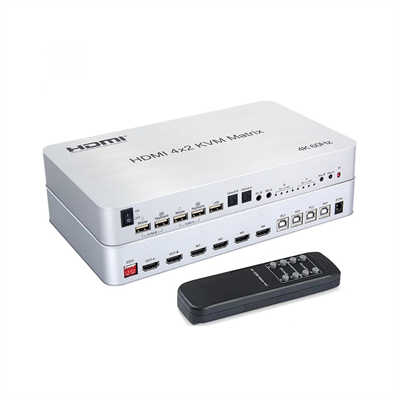
An HDMI matrix switcher is a different animal entirely. Instead of one output, it has many. Instead of routing one source at a time, it can route any input to any output, independently and simultaneously.
Put simply, a matrix switcher takes multiple HDMI sources and distributes them to multiple displays.That “independently” part is what matters. If you have a four-input, four-output matrix, you can send the Blu-ray player to the living room TV, the security camera feed to the kitchen display, and the streaming box to both the bedroom and patio TVs at the same time — all without touching a single cable.
A matrix switcher essentially combines the functions of an HDMI switch and an HDMI splitter into one unit.It gives you the flexibility to duplicate one source across every screen, route completely different sources to different screens, or mix and match in any pattern you need.
These devices come in configurations ranging from compact 4x2 units for small homes to 16x16 and 32x32 rack-mounted systems for commercial installations. Modern HDMI 2.1 matrix switchers support bandwidth up to 48 Gbps, HDCP 2.3, and advanced features like auto-downscaling — which is important when you’re sending a 4K signal to a 1080p display in another room.
Control is where matrix switchers really separate themselves from simple switches. Front-panel buttons, IR remotes, RS-232 serial control, web GUIs, mobile apps, and integration with third-party control systems like Crestron and AMX are all common. You can automate routing with a schedule, trigger it from a control panel, or change it from your phone.
The Core Difference, in Plain Terms
Here’s the simplest way to think about it:
- An HDMI switch is designed for one output path. Multiple sources, one display.
- An HDMI matrix is designed for many output paths. Multiple sources, multiple displays, independent routing.
A switch answers the question: “How do I connect five devices to my TV?”
A matrix answers the question: “How do I get any of these five devices onto any of these four screens, whenever I want?”
That distinction drives everything else — cost, complexity, control options, and the scale of installation each device is suited for.
Inputs, Outputs, and Scalability
The port count tells you a lot about what a device is built for.
A typical HDMI switch has two to five inputs and one output. Some higher-end models, like the InLine 4-way switch, include a USB-C input alongside three HDMI ports, which is handy for modern laptops that skip HDMI altogether.
An HDMI matrix, by contrast, is defined by its input-output configuration. A 4x4 matrix has four inputs and four outputs. An 8x8 has eight of each. The 16x16 8K matrix from BZBGEAR, for instance, lets you independently route any of sixteen HDMI 2.1a sources to any of sixteen displays, with support for 8K@60Hz and 4K@120Hz.
That scalability matters. A switch is a fixed solution for a fixed problem. A matrix is a platform that grows with the room. If you’re planning a multi-room home, a sports bar with several screens showing different games, or a conference center with multiple presentation zones, a matrix is the only option that won’t need to be replaced when the setup expands.
Control and Management: Where Matrices Pull Ahead
You can absolutely get by with a remote and a button on a switch. Most people do.
But once you’re managing four, eight, or sixteen displays, manual control stops being practical. Matrix switchers typically offer:
- Front-panel pushbuttons for direct access
- IR remote for line-of-sight control
- RS-232 serial for integration with control systems
- Ethernet / Web GUI for network-based management
- Mobile apps for iOS and Android
- Third-party integration with platforms like Crestron, AMX, and Extron
EDID management is another critical feature that separates serious matrix switchers from basic switches. Without proper EDID handling, a source might not know what resolution or audio format the display can accept, leading to black screens, missing audio, or dropped resolution when you switch routes.A good matrix handles the HDCP handshake cleanly and tells each source exactly what it needs to know for every connected display.
Switches often have EDID dip switches too, but the scope is much narrower. You’re managing one display, not a fleet of them.
HDMI 2.1 and the Bandwidth Question
The HDMI 2.1 standard changed what’s possible with AV routing. Full 48 Gbps bandwidth enables 8K at 60Hz, 4K at 120Hz, variable refresh rate, auto low-latency mode, and HDR formats including HDR10+ and Dolby Vision.
For switches, HDMI 2.1 support is increasingly common in premium models. The InLine 4-way switch, for example, handles 48 Gbps across its HDMI inputs and supports 4K@120Hz with 12-bit color.That’s more than enough for a PS5 or Xbox Series X connected to a single TV.
Matrix switchers have embraced HDMI 2.1 as well, but the engineering challenge is greater because every input and every output must maintain signal integrity across multiple simultaneous routes. The BZBGEAR 16x16 matrix supports 48 Gbps and HDCP 2.3, with auto-downscaling on every output so that a 4K source can feed a 1080p display without compatibility issues.
If you’re running a 4K/120Hz gaming setup on a single screen, an HDMI 2.1 switch is the straightforward choice. If you need that same signal routed to multiple displays with different capabilities, you need a matrix that can handle the bandwidth and the scaling.
Market Data: Where the Industry Is Heading
The AV routing market is growing steadily, and the numbers tell a story about how people are actually using these devices.
The global HDMI matrix switcher market was valued at approximately $1.86 billion in 2024 and is projected to reach $3.5 billion by 2035, growing at a compound annual growth rate of around 5.9% during that period.That growth is driven largely by commercial demand — conference rooms, control centers, digital signage, and hybrid work environments that need reliable multi-source, multi-display routing.
The HDMI switch market, on the consumer side, is growing even faster in percentage terms. The global HDMI switch market was valued at $1.22 billion in 2025 and is expected to exceed $2.49 billion by 2035, representing a CAGR of over 7.4%.The premium segment — switches priced above $50 — is forecast to grow at 10–12% CAGR, as buyers increasingly want HDMI 2.1, EDID management, and auto-switching rather than the cheapest possible option.
What’s driving the premium shift? More HDMI source devices per household, for one. The average household in major markets is moving from around three HDMI sources in 2026 toward four to five by 2035.The gaming console install base is expanding, and 8K TVs are slowly entering the mainstream, which pushes demand for switches and matrices that can handle the full HDMI 2.1 feature set.
Interestingly, the market data also shows a clear segmentation. Ultra-budget switches — the $15-and-under category — are losing share as promotional pricing makes the cheapest options less appealing. Meanwhile, hybrid products that combine HDMI switching with KVM functionality are gaining traction in the SOHO segment, supporting price points above $80.
Use Cases: Which One Fits Where?
Home Theater (Single Screen)
An HDMI switch. You’ve got a console, a Blu-ray player, and a streaming device. You want them all on one TV. Done. A 4K or 8K switch with auto-switching and a remote is the clean, affordable solution.
Multi-Room Home AV
An HDMI matrix. You want the living room TV, bedroom TV, and patio TV to share sources without running separate cables for each device. A 4x4 matrix lets each screen watch something different, or all screens can show the same thing for movie night.
Sports Bar or Restaurant
An HDMI matrix. Multiple screens showing different games, plus a few displays running digital signage or menus. A matrix lets you route the game feeds independently while pushing promotional content to the signage screens.
Conference Room
An HDMI matrix, almost always. Presenters need to switch between laptops, document cameras, and video conferencing systems, and route those sources to projectors, confidence monitors, and recording equipment. The 4K matrix switches with scalers and seamless switching are standard equipment in this space.
Digital Signage
An HDMI matrix. Retailers, showrooms, and trade show booths use matrices to push the same visual across multiple monitors or route different content to different zones. The ability to control routing over Ethernet makes it practical for installations where the equipment rack is nowhere near the displays.
Simple Desk Setup
An HDMI switch. Two computers, one monitor. Maybe a gaming console too. A compact switch with a remote or auto-switching is all you need.
FAQ
Is an HDMI matrix the same as an HDMI switch?
No. An HDMI switch routes multiple sources to one display. An HDMI matrix routes multiple sources to multiple displays, with the ability to send different sources to different screens simultaneously.
Can an HDMI switch send one source to multiple TVs?
No. A standard HDMI switch has only one output. If you need to send one source to multiple displays, you either need an HDMI splitter (for identical output on all screens) or an HDMI matrix (for independent routing).
Do I need an HDMI matrix for a home theater?
Probably not, unless you have multiple displays in different rooms and want them to share sources. For a single-screen home theater, an HDMI switch is sufficient and far less expensive.
What is the difference between an HDMI matrix and an HDMI splitter?
A splitter takes one input and sends it to multiple outputs — every screen sees the same thing. A matrix takes multiple inputs and routes them to multiple outputs, with each output able to receive a different input.
Do HDMI matrix switchers support 4K and HDR?
Most modern matrix switchers support at least 4K@60Hz with HDR. Higher-end models support 4K@120Hz, 8K@60Hz, HDR10+, Dolby Vision, and HDMI 2.1 features like VRR and ALLM.
How much does an HDMI matrix cost?
Prices vary widely. A basic 4x2 matrix can cost under $100. A professional-grade 4x4 matrix with HDMI 2.1 and scalers typically runs $500 to $2,000. Large 16x16 systems with full 8K support can exceed $10,000. As a point of reference, the global average selling price for HDMI matrix distribution products in 2025 was around $3,740 per unit across commercial and professional applications.
Can I control an HDMI matrix with my phone?
Many modern matrix switchers offer web-based GUIs and mobile apps for iOS and Android, alongside traditional IR and RS-232 control. Some also integrate with home automation systems like Crestron and AMX.
Will an HDMI switch work with a soundbar or AV receiver?
Yes, as long as the switch passes through the audio formats your sound system supports. HDMI switches with eARC or ARC support are available, though you’ll want to check the specifications carefully to ensure compatibility with Dolby Atmos, DTS:X, and other high-bandwidth audio formats.
Final Thoughts
The HDMI matrix vs. HDMI switch question really comes down to one thing: how many screens are you trying to feed?
If the answer is “one,” a switch is the right tool. It’s affordable, simple, and solves a very specific problem without overcomplicating your setup.
If the answer is “more than one, and I want them to do different things,” you need a matrix. It costs more, requires more planning, and demands a bit more technical understanding to configure properly. But it’s the only device that gives you true independent routing across multiple displays.
The market data backs this up. Matrix switchers are holding steady in the commercial and professional AV space, growing at around 5.9% annually, while the consumer switch market is expanding faster — over 7.4% — as households accumulate more HDMI devices and upgrade to HDMI 2.1 for gaming and 8K content.
Both devices have their place. The mistake is buying the wrong one. Now you know which is which.
📖 Related Featured Articles

Using a 2x2 HDMI Matrix for Dual Monitor Productivity: A Practical Guide
Learn how a 2x2 HDMI matrix switch can streamline your dual monitor workflow. Covers productivity da...

How to Set Up a 4x4 HDMI Matrix for a Home Automation System
Learn how to set up a 4x4 HDMI matrix for your home automation system. This guide covers hardware se...

HDMI Matrix for Art Installations and Museums: A Complete Technical Guide
How museums and art installations use HDMI matrix switchers for 4K video distribution, video walls, ...

What Is an HDMI Matrix? The Ultimate Flexibility for Multi-Screen Setups
A complete guide to HDMI matrix switchers: how they work, how they differ from splitters and switche...