HDMI Matrix Switcher: What It Is, How It Works, and Whether Your Setup Actually Needs One
Introduction
If you have ever found yourself crouching behind a TV cabinet, swapping HDMI cables because the game console and the streaming box refuse to share a single port, you already understand the problem that an HDMI matrix switcher solves. These devices have become a staple in home theaters, conference rooms, retail spaces, and control centers, yet many people still confuse them with simpler HDMI switches or splitters. The global HDMI matrix switcher market was valued at approximately USD 1.86 billion in 2024 and is projected to reach USD 3.5 billion by 2035, growing at a compound annual growth rate of roughly 5.9%. That kind of growth suggests these devices are not niche gadgets. They are becoming standard infrastructure for anyone managing more than one screen and more than one source.
What Exactly Is an HDMI Matrix Switcher?
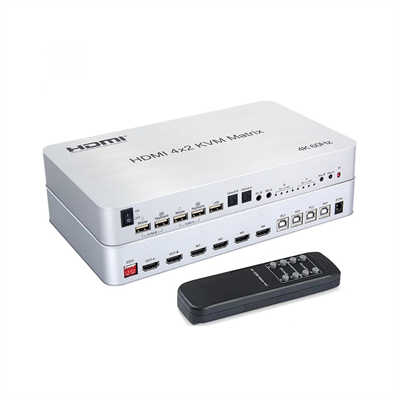
An HDMI matrix switcher is a device that takes multiple HDMI input sources and distributes them to multiple HDMI displays — independently. The key word here is “independently.” Each output can receive a different input, and a single source can simultaneously feed several outputs. So if you have four sources (a Blu-ray player, a gaming console, a laptop, and a streaming stick) and four screens, the matrix lets you send the laptop to the living room TV while the game console goes to the bedroom display, all without touching a single cable.
Black Box describes it as a tool for “central distribution and control of multiple digital and analog HDMI AV signals from one location”. That centralization matters. Instead of running separate cables from every source to every display, you run everything into one box and let the routing engine handle the rest.
A Quick Note on Naming
You will see these devices called HDMI matrix switchers, HDMI matrix switches, or simply HDMI matrices. They all refer to the same category of product. The “matrix” part comes from the N×N configuration — a 4×4 matrix has four inputs and four outputs, an 8×8 has eight and eight, and so on.
How Does an HDMI Matrix Switcher Work?
Understanding the signal path helps clarify why a matrix switcher is more than just a fancy cable organizer. Here is what happens inside the box.
Each source connects to an HDMI input. Each display connects to an HDMI output. When you press a button on the remote, open a web interface, or send a command through a control system, the routing engine inside the matrix maps a specific input to a specific output. The source stays connected. The display stays connected. Only the internal route changes.
Two technologies keep the signal clean during this process. The first is HDCP (High-bandwidth Digital Content Protection), which manages the handshake between protected content and the display. The second is EDID (Extended Display Identification Data), which tells the source what resolutions and audio formats the connected display can accept. Without proper EDID management, switching to a screen that supports only 1080p could force the source to drop its 4K output entirely. A good matrix handles these negotiations automatically, which is why signal integrity holds up even when you are running 4K HDR content through multiple routing changes.
HDMI Matrix vs. Switch vs. Splitter: What Is the Difference?
This is where a lot of confusion lives, so let us break it down clearly.
An HDMI switch takes multiple inputs and lets you select one to send to a single display. It is a many-to-one device. If your TV has three HDMI ports and you have five devices, a switch solves that problem.
An HDMI splitter does the opposite. It takes one input and duplicates it across multiple displays. It is a one-to-many device. If you want the same sports broadcast on the living room TV and the kitchen TV simultaneously, a splitter handles that.
An HDMI matrix switcher combines both functions. It is a many-to-many device. You get the switching flexibility of a switch and the distribution capability of a splitter in one unit. The practical difference shows up when different screens need different content at the same time. A splitter cannot do that. A switch cannot do that. A matrix can.
Who Actually Needs an HDMI Matrix Switcher?
The honest answer is: not everyone. But certain scenarios make a matrix switcher the obvious choice.
Home Theater Enthusiasts
If you have a dedicated media room with a projector, a TV, and multiple gaming consoles, a matrix lets you route each console to the appropriate display without re-cabling. WyreStorm notes that a single 4×2 or 4×4 matrix can serve a living room TV, a bedroom display, and a patio screen from the same pool of sources.
Commercial and Corporate Environments
Conference rooms, training facilities, and boardrooms benefit enormously. One display can show a presentation while another runs a video conference feed, and a third handles digital signage — all managed from a single control point. Eaton Tripp Lite specifically recommends these switches for office buildings, schools, houses of worship, trade shows, and retail settings.
Retail and Hospitality
Restaurants use matrix switchers to feed different menus and TV channels to different zones. Hotels route content to lobby displays, fitness centers, and conference halls from a central rack. Digital signage deployments often rely on matrices because they need to push different content to different screens on different schedules.
Education and Training
Classrooms and lecture halls increasingly use matrix switchers to share sources across multiple projectors and monitors. A teacher can send their laptop to the front-of-room display while a student presentation goes to a secondary screen.
Types of HDMI Matrix Switchers
Not all matrices are built the same, and the right type depends on your space, your budget, and how far signals need to travel.
By Port Count
The most common configurations are 4×4, 8×8, and 16×16. A 4×4 unit suits small conference rooms and home theaters. An 8×8 is the sweet spot for mid-size control rooms and bars or restaurants. A 16×16 or larger serves broadcast facilities and command centers where dozens of sources and displays are in play.
By Transmission Method
Standard HDMI matrix switchers use HDMI cables and work well when sources and displays are within reasonable cable distance. HDBaseT matrices extend signals over Cat6 cabling, pushing 4K video up to 100 meters without signal degradation. IP-based matrices convert HDMI signals to network packets, allowing routing across existing IP infrastructure — useful for large campuses or multi-building deployments.
Fixed vs. Modular
Fixed-port matrices come with a set number of inputs and outputs that cannot be changed. They are cheaper and simpler. Modular chassis matrices let you swap and add I/O cards as your needs grow, and some support redundant power supplies for mission-critical installations. If you expect your setup to expand within a few years, modular is worth the premium.
Key Specifications to Check Before Buying
A few technical details separate a reliable matrix from one that causes headaches.
Bandwidth. For 4K HDR content, you want at least 18 Gbps. For 8K or high-frame-rate 4K (4K120), look for 40 Gbps or higher. Insufficient bandwidth leads to resolution drops or signal failure under load.
HDCP support. HDCP 2.2 or 2.3 is essential if you plan to route protected content from streaming services or Blu-ray discs. Older HDCP versions will block or downscale protected material.
Audio handling. Some matrices support audio extraction through ARC, optical, or analog outputs, letting you send audio to a separate sound system while video goes to the display.
Control options. Basic units use IR remotes. Better ones add RS-232, IP control, and web interfaces. If you are integrating with a control system like Crestron or AMX, IP control is a practical requirement.
Build quality. A metal chassis and active cooling matter more than you might think. Cheap plastic units can overheat during extended use and start dropping signals.
Common FAQs
Can I use an HDMI matrix switcher with any TV? Yes, as long as the TV has an HDMI input and supports the resolution and HDCP version the matrix outputs. Resolution mismatches are handled by EDID management in most modern matrices.
What is the switching time? Typically under three seconds, depending on the model. Some units offer “seamless switching,” which eliminates the black screen between source changes entirely.
Can each output show a different source? Yes. That is the defining feature of a matrix switcher. It is not just splitting one signal — it routes different inputs to different outputs simultaneously.
Do I need a matrix switcher if I only have one display? Probably not. A standard HDMI switch will handle multiple sources to one display at a lower cost. A matrix becomes worthwhile when you have at least two displays that need independent source selection.
Will a matrix switcher degrade my video quality? A quality matrix with sufficient bandwidth and proper HDCP handling will pass the signal through without visible degradation. Cheap units that lack adequate bandwidth or cooling are the ones that cause problems.
Do You Actually Need One?
Here is a straightforward way to decide. Ask yourself three questions:
Do you have more than one display? Do you have more than one source? Do you ever need different screens to show different things at the same time?
If you answered yes to all three, an HDMI matrix switcher is likely the right solution. If you only need to switch between sources on a single screen, a standard HDMI switch will do the job for far less money. And if you only need to mirror one source across multiple screens, a splitter is the simpler and cheaper choice.
The matrix switcher earns its place when your AV setup outgrows what simple switches and splitters can handle. As the market data suggests, more and more installations are reaching that point — particularly as 4K and 8K content becomes standard and multi-display environments shift from luxury to expectation.
📖 Related Featured Articles

Using a 2x2 HDMI Matrix for Dual Monitor Productivity: A Practical Guide
Learn how a 2x2 HDMI matrix switch can streamline your dual monitor workflow. Covers productivity da...

How to Set Up a 4x4 HDMI Matrix for a Home Automation System
Learn how to set up a 4x4 HDMI matrix for your home automation system. This guide covers hardware se...

HDMI Matrix for Art Installations and Museums: A Complete Technical Guide
How museums and art installations use HDMI matrix switchers for 4K video distribution, video walls, ...

What Is an HDMI Matrix? The Ultimate Flexibility for Multi-Screen Setups
A complete guide to HDMI matrix switchers: how they work, how they differ from splitters and switche...