Wireless HDMI Extender: Is It Worth It?
Abstract: This article provides a frank, data‑driven evaluation of wireless HDMI extenders, weighing their convenience against inherent trade‑offs in latency, range, interference resilience, and cost. It breaks down three primary use cases—office conferencing, home theater/gaming, and live events—and shows that the “worth it” answer depends entirely on your environment and performance expectations. Drawing on real‑world latency figures (70–220 ms for 5 GHz units vs. sub‑20 ms for 60 GHz models), market growth data (6.2% CAGR), and price comparisons (from $50 budget kits to $1,000+ pro gear), the piece concludes that wireless HDMI is a valuable problem‑solver for situations where cables are impractical, but it remains a compromise that cannot fully replace a wired connection for latency‑sensitive or high‑fidelity applications.
Wireless HDMI extenders are one of those product categories where the marketing often runs ahead of the physics. Every box promises “ultra-low latency,” “rock-solid signal,” and “4K without compromise”—but the reality is considerably more nuanced. The question isn’t really whether wireless HDMI is “good” or “bad”; it’s whether it’s the right tool for your particular situation. So let’s cut through the glossy language and have an honest conversation about what these devices actually do, where they shine, where they fall short, and whether dropping a few hundred dollars on one makes sense for you.
What Is a Wireless HDMI Extender, Anyway?
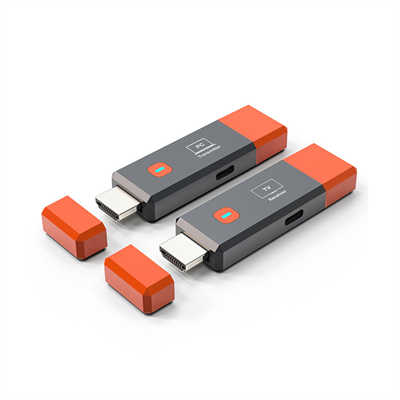
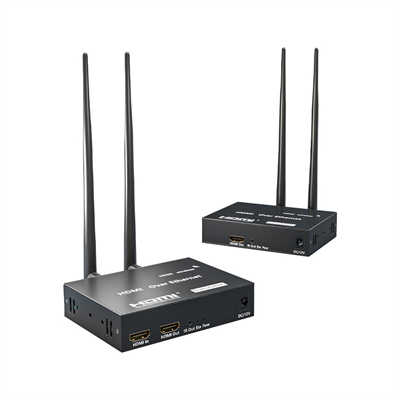
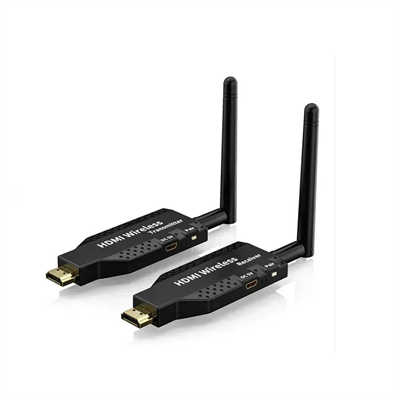
At its core, a wireless HDMI extender replaces the physical HDMI cable between a source device (like a laptop, gaming console, or Blu-ray player) and a display (TV, monitor, or projector) with a wireless connection. The setup is straightforward: you plug a transmitter into the source’s HDMI output and a receiver into the display’s HDMI input, and the signal travels through the air instead of across a cable.
Most consumer-grade extenders operate in the 5 GHz Wi-Fi band, which offers a decent balance between speed and range. Higher-end professional models use the 60 GHz band, which delivers much lower latency but requires a clear line of sight between transmitter and receiver. Some kits also support 2.4 GHz for backward compatibility, though that band is more crowded and prone to interference.
The Three Use Cases: Office, Home, and Events
The value proposition of a wireless HDMI extender depends entirely on where and how you plan to use it. People tend to lump “wireless HDMI” into a single category, but the use cases behind it have almost nothing in common.
The Office: Convenience Over Performance
In a conference room, the point of wireless HDMI is convenience, not performance. You don’t want a cable running across the ceiling to a huddle-room display, and you definitely don’t want to re-cable every time the office layout changes. The signal is usually a static slide deck, a spreadsheet, or a video call—nobody is going to notice 100 ms of latency because the audio on the call bridge is already 200 ms behind. Range is modest (same room, 20 to 50 feet), resolution is almost always 4K or 1080p at 60 Hz, and reliability matters more than speed.
For this scenario, wireless HDMI is absolutely worth it. The alternative—running cables through ceilings, under floors, or across meeting tables—is expensive, disruptive, and inflexible. A one-time investment of $150 to $400 in a wireless kit can save countless hours of setup and teardown, not to mention the aesthetic improvement.
The Home: Latency and Fidelity Matter
Home theater and gaming are where latency gets exposed. A 120 ms lag is invisible in a meeting but completely unusable for a Call of Duty match. Cinema fans want HDR10, Dolby Atmos passthrough, and 4K60 without compression artifacts. Gamers want low latency and full input back-channels so their controller doesn’t feel like it’s fighting the screen. The physical range is usually short—a source cabinet to a wall-mounted TV across a living room—but the quality bar is the highest of the three.
Here’s the short version: the office needs reliable and easy; the home needs latency and fidelity. Any extender that tries to be excellent at all three is either lying or expensive enough to make you wish it wasn’t.
For a home theater setup, wireless HDMI can be worth it—if you’re willing to spend for a high-end 60 GHz model that delivers near-zero latency. The IOGEAR Ultra-Fast 60 GHz Wireless 4K UHD Video Extender, for example, offers near-zero latency ideal for gaming and streaming, with resolutions up to 3840 × 2160 at 30 Hz. But if you’re on a budget and buying a 5 GHz kit, you’re looking at 130–220 ms of latency at 4K60—which is fine for movies but a non-starter for competitive gaming.
Live Events: Range and Robustness
Events break everything. Lighting rigs pump electromagnetic interference, hundreds of phones light up the 2.4 and 5 GHz bands, LED walls have their own switched-mode power supplies, and cameras, IEMs, and comms are already crowding the spectrum. The HDMI signal might have to travel from a front-of-house tech position to a projector at the back of a ballroom or to a stage monitor 80 feet away. You often need the same signal on multiple displays—a main screen, confidence monitors for the presenter, maybe a side stage. Range, multi-display support, and RF robustness are the three things that matter.
For event professionals, wireless HDMI isn’t just worth it—it’s often the only practical solution. The RGBlink ASK Ultra p2p 4K Wireless HDMI Extender, for instance, offers about 16 ms latency and up to 300 meters of range in open layouts, making it a practical choice for live presentation and event workflows. That said, events are also where wireless is most likely to fail, so professionals typically treat it as a convenience layer rather than a primary link.
Wireless vs. Wired: The Numbers Don’t Lie
Let’s be honest: wired HDMI beats wireless almost every time. A certified Premium High Speed HDMI cable can transmit 4K at 60 Hz with 18 Gbps of bandwidth, uncompressed. There’s no latency, no interference, no compression artifacts, and no signal dropouts. A high-quality 20-foot HDMI cable costs about $20 or less.
Wireless HDMI kits, by contrast, are usually over $100—often significantly more. The Eaton Tripp Lite Series HDMI over Wireless Extender Kit with IR, for example, retails around $450. You’re paying a premium for the convenience of no cables, and you’re accepting trade-offs in performance.
But here’s the thing: a cable only works if you can actually run it. If your source is in a different room, if you have a wall-mounted TV with no accessible cable channel, if you’re setting up a temporary display in a rented space, or if you simply don’t want cables running across your living room floor—wireless HDMI solves a problem that a cable simply cannot.
The global market for wireless HDMI video transmitters was valued at approximately $127 million in 2024 and is forecast to reach $192 million by 2031, with a compound annual growth rate of 6.2%. That growth reflects real demand from people who find the trade-offs acceptable for their specific needs.
Latency: What the Numbers Actually Mean
Every wireless HDMI spec sheet lists a latency number, and almost none of them tell you what conditions that number was measured in. Here’s what you actually need to know.
Anything under 50 ms feels instant. Your brain can’t perceive video-to-source lag below roughly two frames at 30 fps, or about 60 ms. Gaming is the exception—competitive gamers start to feel input lag at 30 ms and definitely complain at 50 ms. For everything else in the AV world, anything under 50 ms is functionally invisible. 50 to 120 ms is fine for presentations, movies, and casual viewing.
The problem is that many consumer-grade 5 GHz extenders don’t deliver under 50 ms. The Lenkeng LKV699-V2.0, for example, lists 130–220 ms at 4K60 and 70–120 ms at 1080p60. Those numbers are measured under ideal conditions; real-world performance can be worse.
Higher-end 60 GHz models are a different story. The PeakDo Wireless HDMI Transmitter 4K, for instance, offers latency below 2.5 ms. The RGBlink ASK Ultra delivers about 16 ms. These are genuinely impressive figures, but they come with a catch: 60 GHz signals don’t penetrate walls. You need a clear line of sight between transmitter and receiver.
The Interference Problem
Wireless signals are susceptible to interference from Wi-Fi networks, nearby electronics, and even physical obstacles like walls, metal studs, and tinted glass. Most Pro AV kits work in the 5 GHz Wi-Fi band, which handles interference better than 2.4 GHz but still shares spectrum with your home Wi-Fi network. In a crowded RF environment—think apartment buildings with dozens of overlapping Wi-Fi networks—performance can degrade significantly.
Some extenders address this with channel-switchable technology, allowing you to manually select a cleaner channel. Others use proprietary protocols that are more resilient to interference. But the fundamental limitation remains: wireless is inherently less reliable than a cable. If you need a connection that works every time, without exception, wired is still the way to go.
Range: Line of Sight vs. Reality
Range specifications are another area where marketing tends to oversell. A kit might claim 164 feet of range, but that’s almost always measured in ideal line-of-sight conditions with no obstacles. Add a wall, and that range drops. Add multiple walls, and it drops further.
The Lenkeng LKV699-V2.0, for example, lists one-to-one transmission distance up to 50 meters (164 feet), but one-to-four drops to 15 meters (49 feet). The llano S9 Pro stretches range to 100 meters (328 feet) line-of-sight—double the standard 50-meter ceiling. But again, that’s under ideal conditions.
For most home and office use cases, 20 to 50 feet is plenty. For larger spaces, you need to be realistic about what the kit can actually deliver in your specific environment.
Price: The Elephant in the Room
Let’s talk money. A decent wireless HDMI extender kit starts around $100 and goes up from there. Budget options around $50 exist—the Wekefon and Evatek kits, for example—but they come with compromises in performance and reliability. More than half of Wekefon’s reviewers give it five stars, but there are enough complaints about inconsistent performance to give you pause.
At the $200–$400 price point, you get better latency, better range, and more features like IR passback, HDMI loop-out, and multi-receiver support. The BZBGEAR BG-Air4Kast-MKX, for instance, offers 4K60 transmission up to 164 feet with KVM support and channel-switchable technology.
Professional-grade kits can run $1,000 or more. The Eaton Tripp Lite Series UHD 4K60 Wireless HDMI Extender is rated for sending a signal up to 65 feet using the 5 GHz band—and it costs $450.
Compare that to a $20 HDMI cable, and the value proposition becomes clear: you’re paying for convenience, not performance.
So, Is It Worth It?
The honest answer is: it depends.
Wireless HDMI is worth it if:
- You need to connect a source to a display in a different room or across a space where running a cable is impractical or impossible.
- You’re setting up a conference room, classroom, or event space where flexibility and quick setup matter more than absolute performance.
- You’re a casual gamer or movie watcher who prioritizes a clean, cable-free setup over the absolute lowest latency.
- You’re willing to spend for a high-end 60 GHz model that delivers near-zero latency.
Wireless HDMI is not worth it if:
- You’re a competitive gamer who needs every millisecond of responsiveness.
- You’re building a high-end home theater with uncompressed 4K HDR and Atmos—a cable will simply deliver better quality.
- You’re on a tight budget; a $20 cable will outperform a $150 wireless kit every time.
- You need a connection that works flawlessly in a crowded RF environment with lots of interference.
The market data tells the story: wireless HDMI is growing at 6.2% CAGR because more and more people find the trade-offs acceptable. But it’s not a replacement for a cable; it’s an alternative for specific situations where a cable simply won’t work.
The Bottom Line
Wireless HDMI extenders are a compromise—and that’s okay. They trade a bit of performance, reliability, and budget for the convenience of no cables. In an office, that trade-off is almost always worth it. In a home theater, it’s a tougher call. For live events, it’s often the only practical option.
The key is to be honest about your needs. Don’t buy a $50 5 GHz kit and expect competitive gaming performance. Don’t buy a $450 60 GHz kit and expect it to work through three walls. Match the tool to the job, and wireless HDMI can be a genuinely valuable addition to your AV setup. Buy expecting magic, and you’ll be disappointed.
As one reviewer put it after years of struggling with unreliable HDMI cables: a wireless HDMI extender can be “worth its weight in gold” when it solves a problem that had irritated you for years. Just make sure you know what problem you’re actually trying to solve.
FAQ
Q1: What is the average latency of a wireless HDMI extender?
Latency varies widely by technology. 5 GHz consumer-grade extenders typically deliver 70–220 ms depending on resolution and distance. High-end 60 GHz professional models can achieve under 20 ms, with some as low as 2.5 ms. For most non-gaming applications, under 50 ms is effectively invisible.
Q2: Can wireless HDMI extenders transmit 4K at 60 Hz?
Yes, but not all of them. Higher-end models support 4K60 with 18 Gbps bandwidth. However, 4K60 transmission typically comes with higher latency than 1080p60 because there’s more data to encode, transmit, and decode. Always check the spec sheet carefully.
Q3: How far can a wireless HDMI extender reach?
Range depends on the environment. Line-of-sight ranges typically fall between 50 and 164 feet (15–50 meters). Some models claim up to 656 feet (200 meters) for 1080p. Obstacles like walls, metal studs, and even tinted glass reduce effective range significantly.
Q4: Is wireless HDMI good for gaming?
For casual gaming, yes—if you choose a low-latency model. For competitive gaming, no. Wireless HDMI for gaming trades a cleaner setup for more latency and signal risk. Competitive gamers should stick with a wired HDMI cable.
Q5: What’s the difference between 5 GHz and 60 GHz wireless HDMI?
5 GHz extenders offer better range and wall penetration but higher latency (often 100+ ms). 60 GHz extenders deliver ultra-low latency (single-digit milliseconds) but require a clear line of sight and have shorter effective range.
Q6: Does wireless HDMI work through walls?
It depends on the frequency and the wall. 5 GHz signals can penetrate some walls, though performance degrades. 60 GHz signals generally do not penetrate walls at all—you need a clear line of sight.
Q7: How much does a wireless HDMI extender cost?
Budget models start around $50. Mid-range kits with decent performance run $150–$250. Professional-grade 4K60 kits with low latency can cost $400–$1,000+. A high-quality HDMI cable, by comparison, costs about $20 for a 20-foot run.
📖 Related Featured Articles

HDMI Over Ethernet vs. Wireless: Which Is More Reliable?
Wired or wireless for long-distance HDMI? We compare HDMI over Ethernet vs. wireless HDMI on latency...

HDMI Cable Length Limitations: How Far Can You Really Go? - WinFitin
Understand the physical limits of copper vs. fiber HDMI cables. Learn the maximum reliable distance ...

HDMI Over CAT5 vs. CAT6: Does the Cable Category Matter?
Does CAT6 actually outperform CAT5 for HDMI extension? We break down the distance limits, bandwidth ...

HDMI KVM Extenders: The Complete Guide to Controlling Your PC from Hundreds of Feet Away
Learn how HDMI KVM extenders let you control a PC from hundreds of feet away with zero latency, 4K v...