HDMI Over CAT5 vs. CAT6: Does the Cable Category Actually Matter?
Introduction
Walk into any professional AV installation, and you will almost certainly find HDMI signals traveling over twisted-pair copper cable rather than bulky HDMI copper runs. The logic is straightforward enough—standard HDMI cables start struggling beyond about 10 meters (33 feet), whereas Category cabling can push HD signals ten times that distance or more. But once you decide to go the HDMI-over-CAT route, a question inevitably surfaces: does it matter whether you use CAT5, CAT5e, or CAT6?
The short answer is yes—but not always in the way you might expect. The relationship between cable category and HDMI extension performance is more nuanced than simply assuming that newer and more expensive automatically means better. The cable’s construction, shielding, conductor type, and termination quality often matter as much as the category designation itself. Let us dig into the data and separate the technical realities from the marketing hype.
The Fundamentals: What HDMI Extenders Actually Do
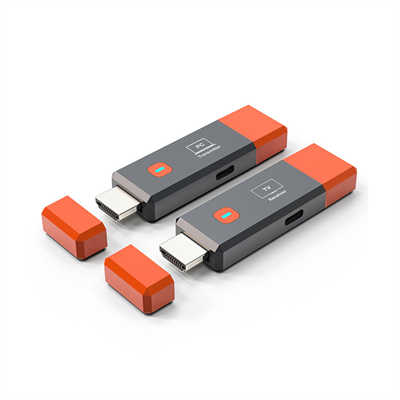
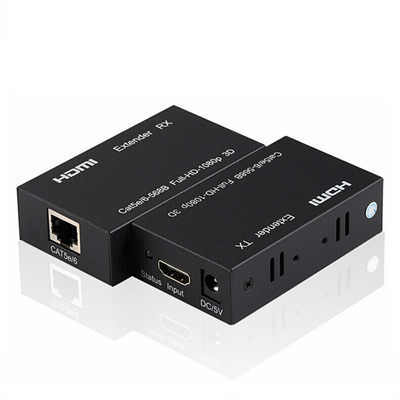
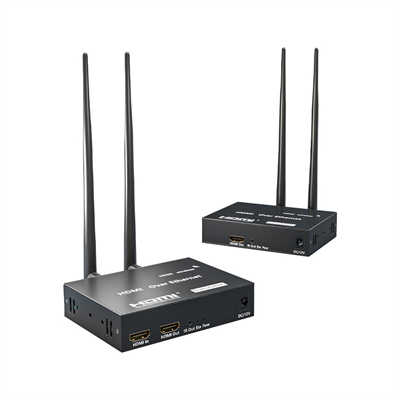
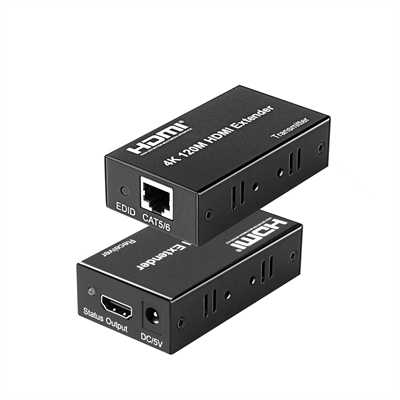
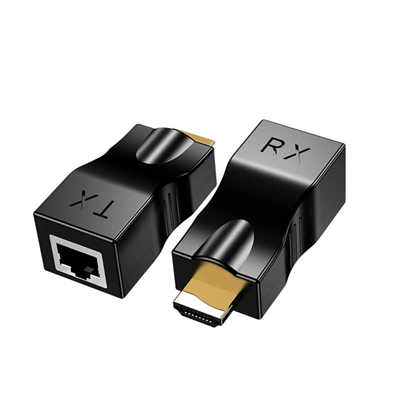
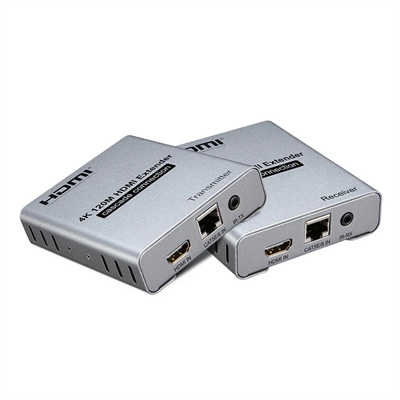
An HDMI extender is essentially a pair of baluns—one transmitter and one receiver—that convert the HDMI signal into a format suitable for transmission over twisted-pair cabling. The transmitter module at the source end takes the HDMI data and sends it across the network cable to the receiver module, which then reconstructs the signal and outputs it to the display. When done correctly, this process yields flicker-free imaging without artificial noise or signal degradation.
The extender itself does most of the heavy lifting. It handles signal equalization, clock recovery, and data reclocking. The cable, in turn, serves as the transmission medium—and its electrical characteristics directly influence how far and how cleanly that signal can travel.
The Technical Divide: CAT5, CAT5e, and CAT6
Before we compare their performance in HDMI extension, it helps to understand what these cable categories actually mean.
CAT5 is the oldest of the three, originally designed to support data rates from 10 Mbps up to a theoretical 100 Mbps at bandwidths of up to 100 MHz. While achieving Gigabit speeds is possible over very short CAT5 runs, maintaining those speeds is largely inconsistent. You would be hard-pressed to find CAT5 in stores today—it has been largely superseded by its enhanced sibling.
CAT5e (enhanced) improved upon CAT5 with tighter specifications for crosstalk and signal integrity. It supports Gigabit Ethernet at 100-meter distances and remains the most common structured cabling standard in existing installations.
CAT6 arrived a few years after CAT5e, offering a substantial jump to 10 Gigabit data transfer at bandwidths of up to 250 MHz. It also features a tighter twist in its pairs, which reduces crosstalk and enables two-way communication capabilities on each pair. However—and this is a critical point—past distances of approximately 164 feet (50 meters), CAT6’s maximum transfer rate reverts back to CAT5e territory.
Bandwidth and Resolution: Where CAT6 Shines
The most straightforward advantage of CAT6 over CAT5e for HDMI extension lies in its bandwidth capacity. HDMI signals are bandwidth-hungry. A 1080p signal at 60Hz requires roughly 3 Gbps. Jump to 4K at 60Hz with 4:4:4 chroma subsampling, and you are looking at 18 Gbps.
CAT5e was designed for 100 MHz operation. CAT6 pushes that to 250 MHz. That extra headroom translates directly into the ability to sustain higher resolutions over longer distances.
Multiple manufacturers confirm this in their specifications. For resolutions greater than 1080i or 1280x1024, CAT6 is consistently recommended—and in some cases, described as “the only viable choice”. This is not marketing fluff; it reflects the fundamental physics of signal integrity over copper.
Consider the numbers from a typical HDMI extender specification:
| Resolution | CAT5 | CAT5e | CAT6 |
|---|---|---|---|
| 4K@30Hz | 80m | 100m | 120m |
| 1080p | 80m | 100m | 120m |
These figures come from a Lenkeng 4K extender, which rates CAT6 at 120 meters versus 100 meters for CAT5e and just 80 meters for CAT5. That is a 20% improvement in reach for 4K signals simply by upgrading from CAT5e to CAT6.
For 4K at 60Hz, the story becomes even more pronounced. A typical HDBaseT extender will push 4K 60Hz up to 35 meters over CAT5e or CAT6. But when you step up to CAT6A or CAT7, that distance can extend to 70 meters or even 100 meters for some implementations. One StarTech HDMI over CAT6 extender, for instance, maintains 4K 60Hz picture quality up to 100 meters (330 feet) over CAT6 cabling.
The Hidden Variable: Solid vs. Stranded Conductors
Here is where the conventional wisdom about cable categories gets turned on its head. Multiple manufacturer manuals and technical guides consistently report a counterintuitive finding: a solid UTP CAT5e cable can transmit signals farther than a stranded STP CAT6 cable.
This is not a trivial observation. It appears across manuals from Satson, PESA, Aurora Multimedia, Avenview, and others. The reason lies in the fundamental electrical properties of the conductors.
Solid core cables—where each conductor consists of a single copper wire—have lower DC resistance and better transmission performance over long distances than stranded cables, where each conductor is made of multiple thinner wires twisted together. Solid cables are typically sold in bulk spools of 300 meters or 1,000 feet and intended for permanent in-wall installation. Stranded cables, by contrast, are usually found as patch cords with pre-molded connectors.
So a high-quality solid CAT5e cable installed as structured cabling will often outperform a stranded CAT6 patch cord for HDMI extension, despite the latter’s higher category rating. The lesson here is that category alone does not tell the whole story—construction quality and conductor type matter enormously.
Shielding: STP vs. UTP
Shielding adds another layer of complexity. Shielded twisted-pair (STP) cables are generally better suited than unshielded (UTP) cables for long HDMI transmission runs, particularly in environments with electromagnetic interference. The shielding helps reduce interference among the twisted pairs, a problem that worsens with longer cable runs.
However—and this is where it gets tricky—some extenders actually require shielded cable to achieve their rated distances. A StarTech HDMI over CAT6 extender with USB, for example, requires shielded CAT6 cable to reach its maximum 50-meter distance. Using unshielded CAT6 reduces the maximum distance to 30 meters, and dropping down to CAT5 cuts it to just 15 meters.
This suggests that for some extender designs, shielding is not merely a nice-to-have feature but a functional requirement for full performance. The extender’s internal equalization and signal processing are tuned assuming a certain level of shielding, and deviating from that assumption compromises the reach.
Distance and Resolution: A Detailed Breakdown
Let us consolidate the distance figures from various sources into a practical reference. Keep in mind that these are manufacturer-rated maximums under ideal conditions—actual performance will vary based on cable quality, termination, and environmental factors.
For 1080p signals:
- CAT5e (solid UTP): Up to 50 meters (165 feet) is common for many extenders
- CAT6 (stranded or solid): Typically 50 meters, though some implementations claim longer
- HDBaseT extenders over CAT5e/6: Up to 70 meters (230 feet) for 1080p
- StarTech HDBaseT: 1080p up to 100 meters (328 feet) over CAT5e or CAT6
For 4K signals:
- CAT5e: Typically 35 meters (115 feet) for 4K@60Hz
- CAT6: Typically 35-40 meters for 4K@60Hz, up to 70 meters for some HDBaseT implementations
- CAT6A: Up to 100 meters for 4K@60Hz with appropriate extenders
- 4K@30Hz over CAT6: Up to 120 meters
For 4K at 60Hz with 4:4:4 chroma (requiring the full 18 Gbps HDMI 2.0 bandwidth), distances shrink considerably. One AV Access extender claims 4K@60Hz 4:4:4 at up to 70 meters (230 feet) over CAT6. Another StarTech unit pushes 4K 60Hz to 50 meters over CAT6. The 100-meter 4K 60Hz claims typically apply only to CAT6A or CAT7 cabling.
Latency: Does Cable Category Affect It?
Latency in HDMI-over-CAT systems is primarily a function of the extender’s processing, not the cable itself. The signal travels at roughly the speed of light through copper—about 0.7c—so cable length adds negligible delay. A 100-meter run adds roughly 0.5 microseconds of propagation delay.
The extender’s encoding, compression (if any), and reclocking introduce the real latency. For a typical HDMI extender, you might see 80-130ms at 1080p and 150-220ms at 4K@30Hz. These figures are determined by the extender hardware and firmware, not by whether you use CAT5e or CAT6.
That said, a marginal cable that introduces errors may force the extender to engage error correction or retransmission, which could increase effective latency. But under normal operating conditions, cable category has no meaningful impact on latency.
Termination and Installation Practices
The manuals consistently emphasize one point: termination quality matters. EIA/TIA-568-B termination (T568B) is universally recommended for better performance. This is not optional advice—it reflects the fact that poor terminations introduce impedance mismatches, reflections, and signal loss that can cripple an otherwise excellent cable run.
One manufacturer even notes that if your HDMI display has multiple inputs, the first HDMI input generally produces better transmission performance than the others. This is a reminder that the entire signal chain—source, cable, extender, and display—must be optimized for reliable long-distance HDMI transmission.
When CAT6 Is the Only Choice
For resolutions greater than 1080i or 1280x1024, multiple sources agree that CAT6 is the recommended—and sometimes mandatory—choice. The bandwidth demands of higher resolutions simply exceed what CAT5e can reliably sustain over meaningful distances.
If you are running 4K at 60Hz, especially with HDR or 4:4:4 chroma, CAT6 is not optional—it is the minimum baseline. For 4K at 60Hz over distances beyond 50 meters, you may need to step up to CAT6A or even CAT7.
For 1080p at moderate distances (up to 50 meters), CAT5e remains perfectly adequate—provided you use solid conductor cable with proper terminations. Many professional AV installers continue to use CAT5e for 1080p installations because it is cost-effective and performs well within its design parameters.
Practical Recommendations
For 1080p installations under 50 meters: CAT5e with solid conductors and proper T568B terminations will serve you well. Save the budget for higher-quality connectors and careful installation.
For 1080p installations over 50 meters or through high-EMI environments: Step up to CAT6, preferably shielded (STP). The extra headroom and shielding will provide a safety margin.
For 4K at 30Hz: CAT6 is strongly recommended. The distance advantage over CAT5e—typically 120 meters versus 100 meters—is worth the modest cost premium.
For 4K at 60Hz: CAT6 is the minimum. For runs beyond 35-40 meters, consider CAT6A or CAT7. Verify that your extender supports the cable type you plan to use.
For any installation: Use solid conductor cable for permanent runs. Avoid stranded patch cords for in-wall installations. Terminate properly to T568B standards. Test your runs before committing to the final installation.
The Bottom Line
Does cable category matter for HDMI over CAT extension? Absolutely—but not in a simple, linear way. CAT6 offers higher bandwidth, better crosstalk rejection, and longer reach for 4K signals. However, a high-quality solid CAT5e cable will outperform a cheap stranded CAT6 cable every time. Shielding, conductor type, and termination quality often matter as much as the category printed on the jacket.
For 1080p applications, CAT5e remains a perfectly viable choice. For 4K, CAT6 is the new baseline—and CAT6A or CAT7 may be necessary for the longest runs at the highest resolutions. The key is to understand that the cable is part of a system: the extender, the cable, the terminations, and the environment all interact to determine success.
Choose wisely, terminate carefully, and test thoroughly. Your HDMI signal will thank you.
Frequently Asked Questions
Q: Can I use existing in-wall CAT5e for 4K HDMI extension?
A: Yes, but with limitations. Most 4K extenders will push 4K@60Hz up to about 35 meters (115 feet) over CAT5e. For longer runs or 4K@60Hz with HDR, CAT6 or better is recommended.
Q: Will CAT6 always give me longer distance than CAT5e?
A: Not necessarily. A solid UTP CAT5e cable can actually transmit farther than a stranded STP CAT6 cable. The cable’s construction—solid vs. stranded conductors—and shielding matter as much as the category rating.
Q: Do I need shielded (STP) cable for HDMI over CAT?
A: It depends on your extender and environment. Some extenders require shielded cable to reach their rated distances. In high-EMI environments, STP provides better noise immunity.
Q: What’s the maximum distance for 4K 60Hz over CAT6?
A: Typically 35-50 meters for most extenders. Some HDBaseT extenders claim 70 meters for 4K 60Hz over CAT6. For 100 meters at 4K 60Hz, you generally need CAT6A or CAT7.
Q: Does cable category affect HDMI video quality?
A: Not directly—the extender either recovers the signal successfully or it does not. However, marginal cable can cause dropouts, sparkles, or complete signal loss. CAT6 provides more margin for error, especially at 4K resolutions.
Q: Can I use CAT5 (not CAT5e) for HDMI extension?
A: It is not recommended. CAT5 lacks the bandwidth and crosstalk specifications of CAT5e. Most extenders specify CAT5e as the minimum. Using plain CAT5 will significantly reduce your maximum distance.
📖 Related Featured Articles

HDMI KVM Extenders: The Complete Guide to Controlling Your PC from Hundreds of Feet Away
Learn how HDMI KVM extenders let you control a PC from hundreds of feet away with zero latency, 4K v...

HDMI Over Ethernet vs. Wireless: Which Is More Reliable?
Wired or wireless for long-distance HDMI? We compare HDMI over Ethernet vs. wireless HDMI on latency...

HDMI Over Long Distance: 5 Proven Ways to Extend 100+ Feet Without Signal Loss
Standard HDMI cables fail beyond 25 feet for 4K. Learn 5 proven ways to extend HDMI over 100+ feet —...

Wireless HDMI Extender: Is It Worth It?
Is a wireless HDMI extender worth the investment in? We analyze latency, range, interference, pricin...