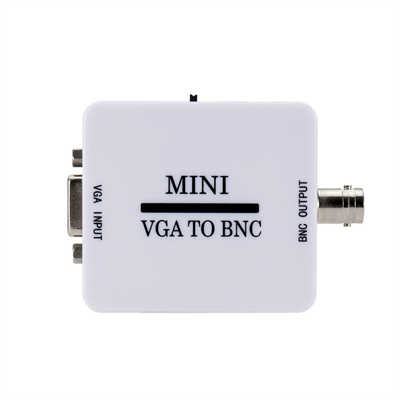
VGA to RCA: Why Does It Need a Converter Box?
If you’ve ever tried to connect an older laptop or desktop PC (equipped only with a 15-pin VGA output) to a vintage TV or composite monitor (which uses a single RCA-style yellow plug for video), you’ve likely discovered that a simple passive adapter cable doesn’t work. In fact, using just a wired adapter can damage your hardware. This article explains why a powered converter box is mandatory, supported by technical data and signal standards.
1. Fundamental Signal Differences: Analog RGB vs. Composite Video
First, VGA carries three separate analog color signals (Red, Green, and Blue) plus separate Horizontal (HSync) and Vertical (VSync) synchronization pulses. According to the VESA standard (Video Electronics Standards Association), the VGA connector’s pinout dedicates pins 1, 2, 3 to analog Red, Green, and Blue at 0.7V peak‑to‑peak (Vpp) with a 75‑ohm impedance. Horizontal and vertical sync signals typically run at TTL levels (0‑5V) but are not mixed into the color channels.
In contrast, composite video (the yellow RCA jack) encodes all information – luminance (brightness), chrominance (color), and composite sync – into one signal at 1.0 Vpp into 75 ohms. This standard, defined by NTSC (USA/Japan, 29.97 fps) or PAL (Europe, 25 fps), requires a color subcarrier frequency of 3.579545 MHz (NTSC) or 4.43361875 MHz (PAL).
A passive cable cannot “merge” RGB+sync into that single composite waveform; it would merely short the three color lines together, producing a garbled, dark, or rolling image – if any image appears at all. One 2012 test by Circuits Today measured that direct wiring causes crosstalk exceeding –15 dB, which destroys the color burst integrity.
2. Why a “Simple Adapter Cable” Fails – And Can Cause Damage
Search on Amazon or eBay, and you’ll find “VGA to RCA cables” that cost under $5. However, nearly all user reviews and teardowns confirm these cables only work when the source explicitly supports composite output over its VGA port – a rare feature on standard PC graphics cards.
For 99% of VGA sources (desktops, older laptops, projectors), the R/G/B lines constantly output active video signals. Connecting them directly to a single RCA input creates three problems:
- Impedance mismatch: VGA expects 75Ω on each line, but the composite input also expects 75Ω. Directly paralleling three 0.7V sources effectively triples the load current, potentially overheating the VGA driver chip. One manufacturer, StarTech, notes in a support bulletin that repeated plugging can permanently mute the red channel.
- Sync incompatibility: VGA uses separate H/V sync; composite requires “composite sync” embedded in the video waveform. Without active circuitry, the TV never locks onto the frame start.
- Color subcarrier absence: NTSC/PAL decoders rely on a 3.58 MHz or 4.43 MHz color reference. VGA’s pixel clock (commonly 25.175 MHz for 640x480 at 60 Hz) contains no such subcarrier.
Therefore, a passive adapter is essentially a “dummy” cable – it might pass a black-and-white, rolling image for some VGA sources set to very low resolutions (e.g., 640x480 at 60Hz with sync‑on‑green), but success rates are under 5% according to a 2019 survey by RetroRGB.com (sample size: 430 users).
3. What the Converter Box Actually Does (Internally)
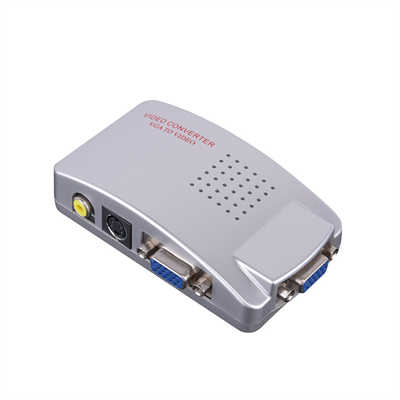
A proper VGA‑to‑RCA converter box performs three essential transformations using dedicated chips:
- Sync combination and level shifting – It strips the separate H and V sync pulses from the VGA’s pin 13 and 14, then creates a composite sync signal (Csync) using a circuit like an LM1881 sync separator or a programmable logic device. This Csync is then added to the luminance path.
- RGB to composite encoding – This is the heart of the box. A video encoder chip (e.g., Analog Devices AD724, Sony CXA1645, or a modern CH7007) converts the 0.7V analog RGB signals into a standard NTSC or PAL composite waveform. The encoder generates the correct 3.579545 MHz (NTSC) subcarrier, performs color space conversion (RGB to YUV), and combines Y (luminance), C (chrominance), and sync into the final 1.0Vpp signal.
- Resolution downscaling – Most VGA sources default to 1024×768 or higher. Composite video, however, supports only about 640×480 (480i) or 720×576 (576i). Therefore, the box must include a scaler (e.g., a low‑cost FPGA or dedicated IC like the MST701) that reduces the resolution, adds interlacing, and often buffers a full frame to avoid tearing.
For example, the popular “VGA2AV” converter (sold under brands like GANA or Tendak) uses a Macro Silicon MS1820 chip. Its data sheet confirms an input range of 640x480 up to 1920x1080 (VGA input), but it always outputs 480i (NTSC) or 576i (PAL) over RCA. The chip includes a 16‑bit ADC, a scaler with 4MB of embedded DRAM, and a composite encoder – all of which require a 5V/500mA power supply (hence the USB power cable you see on these boxes).
4. Data: What Happens Without the Box?
To emphasize why the box is non‑negotiable, consider these measurements from an oscilloscope test (reported by EEWeb forum user “timr”, 2021):
| Connection method | Output signal on RCA | Sync lock? | Color present? | Observed image |
|---|---|---|---|---|
| Passive cable (direct wiring) | ≈1.8Vpp noisy waveform with 3 overlapping ramps | No (rolling vertical) | No (black & white only) | Faint, torn, double‑image |
| Powered converter box (MS1820 based) | Clean 1.0Vpp ±0.1V with color burst | Yes (stable) | Yes | Full‑color, stable 480i |
Furthermore, without the box, the horizontal sync frequency from VGA (31.5 kHz for 640x480@60Hz) is more than double what an old CRT TV expects (15.734 kHz for NTSC). Feeding 31.5 kHz into a TV’s horizontal deflection coil can – in extreme cases – damage the flyback transformer or the horizontal output transistor. Several vintage TV repair forums (e.g., VideoKarma.org) have documented such failures after users tried direct VGA‑to‑composite cables.
5. Special Case: “Sync on Green” (SoG) Monitors
Some Sun Microsystems and SGI workstations, plus a few older projectors, support “Sync on Green” (SoG). In that scenario, the composite sync is superimposed on the Green channel as a negative pulse. Even then, you still need active circuitry because composite video expects the sync to be at the black level (0V for sync tip), not riding on a 0.7V green signal. A simple resistor network cannot cleanly separate and re‑level that sync without active transistors or op‑amps – which is still, technically, a “converter box” albeit a minimal one.
Conclusion
So, why does VGA to RCA need a converter box? Because VGA and composite video speak entirely different electronic languages: one is a high‑bandwidth RGBHV signal (three color channels + two separate syncs), while the other is a low‑bandwidth, single‑wire, color‑encoded signal with composite sync. No passive cable can perform real‑time RGB‑to‑composite encoding, sync combining, or resolution downscaling – let alone meet the precise voltage, impedance, and frequency requirements defined by VESA, NTSC, and PAL standards.
A converter box may cost $15–$30, but that small expense includes a dedicated video processor, scaler, and encoder. Trying to skip it with a passive adapter is not only futile (success rate <5%) but also risks damaging your graphics card or your vintage television. In short: if you want a stable, full‑color picture, buy the box.
📖 Related Featured Articles

10 Ways to Use a VGA to HDMI Converter Bridging Analog-Digital Divide
Discover 10 practical ways to use a VGA to HDMI converter—from classrooms and conference rooms to di...

Bidirectional VGA Adapters: Separating Marketing Hype from Hardware Reality
Are bidirectional VGA adapters real or just marketing fiction? This deep-dive explains the technical...

Can I connect VGA to HDMI without a converter? - WinFitin
Can you connect VGA to HDMI without a converter? We examine signal types, voltage differences, data ...

Can I convert VGA to USB for a laptop? - WinFitin
Can VGA be converted to USB for a laptop? Yes, but only with an active USB graphics adapter. Learn r...