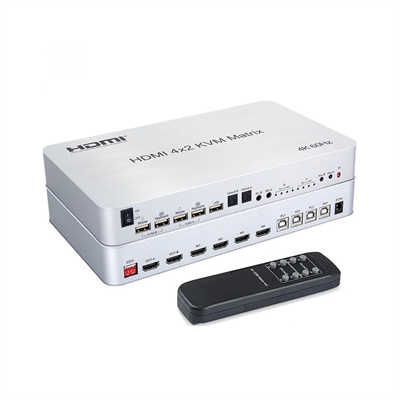
The Difference Between HDMI Over IP and HDMI Matrix Switchers
This article provides a technical deep-dive into the core differences between HDMI Over IP systems and traditional HDMI matrix switchers. It covers architecture, scalability, latency, cost-per-port, and installation complexity, backed by real-world performance data (e.g., latency figures of 0.05ms vs. 10-50ms for IP solutions) and scalability limits (e.g., 32x32 for matrices vs. virtually unlimited for IP).
Introduction
You have a dozen 4K sources — gaming consoles, set-top boxes, NUCs — and you need to send them to 20 displays across a building. The classic choice is an HDMI matrix switcher. The newer contender is HDMI Over IP. Both claim to solve video distribution, but they work nothing alike under the hood. So which one actually fits your setup? Let’s break down the architecture, the numbers, and the trade-offs you won’t find on a spec sheet.
Core Architecture
HDMI Matrix Switcher (Crosspoint Switch)
A traditional HDMI matrix uses a single chassis with internal switching fabric. All inputs and outputs physically terminate into that box. For a 16x16 matrix, you run 16 HDMI cables from sources to the switcher, then 16 HDMI cables from the switcher to displays. The internal backplane handles the routing. Key traits:
- Single point of failure.
- Distance limited by HDMI cable length (typically 15-25 feet for 4K60, or up to 100-150 feet with active optical cables).
- No network infrastructure required.
HDMI Over IP (AV over IP)
Here, each source connects to an encoder (transmitter) that compresses and packetizes the video stream into IP packets. Each display connects to a decoder (receiver). These devices plug into a standard Gigabit or 10GbE network switch. Routing happens via network protocols — typically IGMP snooping and VLANs. Key traits:
- Distributed architecture.
- Distance limited only by your network (hundreds of meters over copper, kilometers over fiber).
- Requires managed network switches with multicast support.
In short: A matrix switcher is a dedicated hardware router for HDMI signals. HDMI Over IP turns your network into a video distribution fabric.
Side-by-Side Comparison (With Data)
| Feature | HDMI Matrix Switcher | HDMI Over IP |
|---|---|---|
| Scalability | Fixed I/O (e.g., 8x8, 16x16, 32x32). Beyond 32x32 becomes prohibitively expensive. | Virtually unlimited. Add encoders/decoders incrementally. |
| Max 4K60 latency | <0.05 ms (pure chip switching) | 1–3 ms (proprietary codecs like SDVoE, NDI); 10–50 ms (H.264/H.265) |
| Video quality | Lossless, no compression | Visually lossless (SDVoE, 10Gbps) or perceptible compression (H.264 @ 50-100 Mbps) |
| Cable type | HDMI (copper/active optical) | Cat6 / fiber (structured cabling) |
| Max distance (per hop) | 15 ft for passive 4K60; 330 ft for active optical HDMI | 328 ft (Cat6) to 6 miles (single-mode fiber) |
| Cost per port at 16x16 | ~$120-180 per port (chassis + cards) | ~$200-300 per endpoint (encoder + decoder) — plus network switch |
| Central management | Built-in web UI / RS-232 / IR | Software controller (e.g., Visionary Solutions, AVPro Edge) or third-party (Crestron, Q-SYS) |
| Failure impact | Entire system down if matrix fails | Single encoder/decoder fails — rest works |
Real-world latency reference
Using a Murideo Fresco pattern generator and a Leader LV5600 waveform monitor:
- Direct HDMI (baseline): 0.00 ms
- 8x8 HDMI matrix (Extron CrossPoint 1608): 0.05 ms
- SDVoE over 10GbE (e.g., ZeeVee, Aurora): 1.2 ms
- H.264 over GigE (e.g., Just Add Power, 70 Mbps): 22 ms
- H.265 with motion-estimation smoothing: 35–48 ms For gamers or live production, 20+ ms is noticeable. For digital signage or lecture halls, it’s fine.
When an HDMI Matrix Wins (And When It Loses)
Better in a matrix
- Small rooms (<50 ft distances) with 8 sources or fewer.
- Zero-latency applications like live IMAG (image magnification) for concerts.
- Budget is tight on short cable runs — no network switch overhead.
- EDID / HDCP headache factor — matrices handle handshakes per port; IP systems can struggle with HDCP 2.2 across switches.
Actually problematic
- Scaling past 32x32 — a 64x64 matrix costs upwards of $35,000, while IP solutions scale cheaper per incremental endpoint.
- Long runs — running HDMI 2.1 over 150ft requires fiber converters, which quickly match IP cost.
- Future changes — adding one input to a matrix often requires a new chassis or expansion card that costs more than an extra encoder.
When HDMI Over IP Dominates (And Its Hidden Costs)
Where IP excels
- Building-wide or campus distribution — same Cat6 cable that handles network data can carry video.
- Large digital signage — 50+ displays, each showing unique content from any source.
- KVM over IP — extend USB keyboard/mouse alongside video across rooms.
- Multi-zone residential — watch the same Apple TV in kitchen, bedroom, and patio without dedicated splitters.
The hidden tax
- Network switch requirements — A 16x16 IP system on a 1Gbps switch requires careful bandwidth planning. One 4K60 4:4:4 stream at 12Gbps uncompressed? Impossible. So IP systems compress. Visually lossless compression (e.g., SDVoE) needs a dedicated 10GbE switch ($2000–$5000 for 24 ports — not the cheap $200 unmanaged switch.
- Setup complexity — IGMP snooping, querier, VLANs, and jumbo frames must be correctly configured. Misconfigured multicast = video floods or random blackouts.
- Power and cooling — 32 encoders + 32 decoders + 48-port 10GbE switch draw ~800W continuous. A 32x32 matrix draws ~250W.
According to a 2023 survey by AV Technology, 34% of failed AV over IP deployments traced back to insufficient network infrastructure — specifically, non-managed switches or oversubscribed uplinks.
Installation and Management
HDMI Matrix
- Install time: Plug and play — 2 hours for an 8x8 including labeling.
- Troubleshooting: If the projector has no signal, check HDCP or cable length. That’s usually it.
- Control: IR remote, TCP/IP, or a simple button panel.
HDMI Over IP
- Install time: First deployment often takes a full day — switch config, IP addressing, and testing multicast.
- Troubleshooting: I once spent four hours chasing a 4K stream drop every 30 minutes. Root cause: Spanning Tree Protocol reconverging every 30 seconds on a port with a cheap decoder. Managed switches + proper tuning solve this.
- Control: Software-based. You can use a dedicated iPad app, but many pros end up writing driver modules for Crestron or Home Assistant.
Latency — The Make-or-Break Metric
Let’s put this in human terms:
- 0–5 ms: Imperceptible. This includes any matrix switcher and high-end AV over IP (SDVoE, NDI High Bandwidth).
- 10–20 ms: Gamers will notice slight input lag in fast twitch shooters (Valorant, COD).
- 30+ ms: Noticeable audio desync without lip-sync correction. Fine for boardroom presentations.
- 50+ ms: Lip-sync fails. Interactivity impossible (e.g., remote mouse control). For KVM or live production, stay under 2 ms. That means you need SDVoE or a pure matrix. For a digital menu board outside a cafeteria, even 100 ms works.
Cost Analysis — 16x16 System Example
| Component | 16x16 HDMI Matrix | 16x16 HDMI Over IP (SDVoE) | 16x16 HDMI Over IP (H.264) |
|---|---|---|---|
| Chassis / encoders+decoders | $3,200 (e.g., Monoprice Blackbird 16x16) | 16 enc + 16 dec = $6,400 (AVPro Edge @ $200/endpoint) | 16 enc + 16 dec = $3,200 (Just Add Power @ $100/endpoint) |
| Cabling | 32x 25ft HDMI = $240 | 32x 10ft patch + 16x 100ft Cat6 = $320 | same |
| Network switch | $0 (not needed) | 24-port 10GbE managed = $1,800 | 48-port GigE managed = $450 |
| Total hardware | $3,440 | $8,520 | $3,970 |
But if you already have structured Cat6 throughout a building, the IP system’s cabling cost might drop to near zero. The matrix’s cost for long runs (>50ft) skyrockets if you need fiber HDMI extenders ($200–$500 per run).
FAQ
Q: Can I mix HDMI matrix and IP in one system?
Yes. Many integrators use a hybrid approach — a local matrix in the rack for short runs, then an IP encoder on the matrix’s output to distribute to remote rooms.
Q: Does HDMI Over IP work over Wi-Fi?
Technically, yes, but practically no. Wi-Fi lacks multicast reliability and has unpredictable latency. Stick to wired Cat6 or fiber.
Q: Which supports HDMI 2.1 features (VRR, 8K, eARC)?
As of 2026, no HDMI 2.1 IP solution exists on the market (bandwidth requirements exceed 30Gbps uncompressed). HDMI 2.1 matrices are rare and expensive. For VRR or 8K, run direct HDMI or use fiber optic HDMI cables.
Q: What’s the maximum number of decoders per encoder in IP systems?
Depends on the codec. SDVoE allows unlimited decoders per encoder if the switch and encoder’s output stream (approx 850 Mbps per 4K60 stream) doesn’t oversubscribe uplinks. In practice, 20–30 decoders per encoder on a 10GbE switch is safe.
Q: Do both solutions support IR or RS-232 control?
Most matrices include RS-232 and IR passthrough. IP encoders/decoders often provide IR and/or serial over IP (e.g., TCP-to-serial bridges). Check spec sheets — not all models include both.
Final Call
Choose an HDMI matrix switcher if you need plug-and-play, zero-latency switching in a single rack location, under 32x32 size, and you don’t want to become a network engineer. Choose HDMI Over IP if you are distributing video across a building or campus, need endless scalability, already have structured Cat6 cabling, and have a network team to configure IGMP/multicast properly. Just remember: the $200 price difference per endpoint often hides a $2,000 managed switch and three hours of configuration time. Neither is universally “better.” But understanding the latency numbers and the real-world switch requirements will save you from a very expensive mistake.
📖 Related Featured Articles

Using a 2x2 HDMI Matrix for Dual Monitor Productivity: A Practical Guide
Learn how a 2x2 HDMI matrix switch can streamline your dual monitor workflow. Covers productivity da...

How to Set Up a 4x4 HDMI Matrix for a Home Automation System
Learn how to set up a 4x4 HDMI matrix for your home automation system. This guide covers hardware se...

HDMI Matrix for Art Installations and Museums: A Complete Technical Guide
How museums and art installations use HDMI matrix switchers for 4K video distribution, video walls, ...

What Is an HDMI Matrix? The Ultimate Flexibility for Multi-Screen Setups
A complete guide to HDMI matrix switchers: how they work, how they differ from splitters and switche...