What Is a VGA Balun (Cat5 Extender)? A Complete Guide
1. The Short Definition
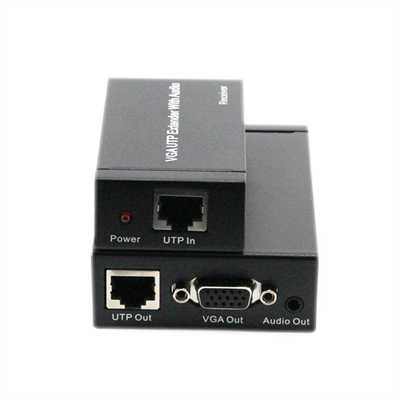
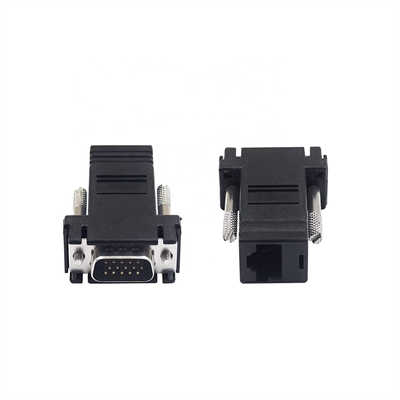
A VGA balun (often called a Cat5 extender or VGA over Cat5 balun) is a passive or active electronic device that adapts a standard 15-pin VGA signal so it can travel over unshielded twisted‑pair (UTP) cable — usually Cat5, Cat5e, or Cat6. On the sending end, the balun converts the RGBHV (red, green, blue, horizontal sync, vertical sync) signals into differential signals suitable for twisted‑pair transmission. A matching receiver balun converts them back to standard VGA levels. In short: you get VGA extension up to 300 m (≈1000 ft) instead of the usual 5 m (15 ft) limit of a standard VGA cable.
2. Why Use a VGA Balun? (Key Advantages Over Standard Cables)
A standard VGA cable suffers from:
-
Attenuation – at 100 MHz, a 15 m (50 ft) VGA cable can lose 6–10 dB, causing ghosting.
-
Crosstalk – unshielded VGA cables easily pick up 60 Hz hum and EMI.
-
Bulk & cost – a 100 m (330 ft) VGA cable is heavy, stiff, and expensive. A VGA balun over Cat5 solves this:
Parameter Standard VGA cable (15 m) VGA balun + Cat5e (300 m) Max distance (1024x768) ~15 m (50 ft) 300 m (1000 ft) Cable cost per 100 m $80–120 $20–30 (Cat5e) Bend radius Large, fragile Small, flexible EMI immunity Poor Excellent (differential) Real-world data: With a passive balun, you can expect usable 1280x1024 at 200 m. At 300 m, 800x600 is more realistic. Active baluns (with built‑in equalization) can push 1920x1080 up to 150 m.
3. How It Works – A Technical Breakdown
A VGA signal consists of five independent analog components: R, G, B (0–0.7 V, 75 Ω termination) plus H‑sync and V‑sync (TTL levels, 5 V). The balun does three things:
-
Impedance matching – VGA expects 75 Ω coaxial. Cat5 has 100 Ω differential impedance. The balun transforms 75 Ω unbalanced to 100 Ω balanced.
-
Differential conversion – Each color channel is sent as a differential pair (pin 1/2 for Red, 3/6 for Green, 4/5 for Blue in many wiring schemes). This cancels common‑mode noise.
-
Skew management – Cat5 pairs have different lengths (twist rates vary). For 300 m, pair‑to‑pair skew can reach 40 ns. That’s why high‑end active baluns include skew compensation (adjustable delay per color). Passive baluns require no power. They use transformers (1:1 or 1:2 turns ratio) and resistors. Active baluns use op‑amps or specialized ICs (e.g., EL4543, AD8145) to equalize high‑frequency loss. A typical active receiver provides +6 dB gain at 100 MHz to compensate for cable attenuation.
Data point: Cat5e attenuation at 100 MHz is about 22 dB per 100 m. Without equalization, a passive balun loses sync above 150 m at 1024x768.
4. Wiring Standards – Which Pins Go Where?
There is no universal standard, but the most common VGA‑to‑Cat5 pinout (used by Extron, MuxLab, and Startech) is:
| VGA pin | Signal | Cat5 pair (T568B) | Cat5 pin |
|---|---|---|---|
| 1 | Red | Pair 1 (Blue/White) | 5 & 4 |
| 2 | Green | Pair 2 (Orange/White) | 1 & 2 |
| 3 | Blue | Pair 3 (Green/White) | 3 & 6 |
| 13 | H‑sync | Pair 4 (Brown/White) | 7 & 8 |
| 14 | V‑sync | Pair 4 (Brown/White) | 7 & 8 |
Note: Some baluns combine H/V sync onto one pair using a sync‑mux technique – but that requires active circuitry. Always check the datasheet. Connecting a balun with the wrong pinout can damage the VGA source (shorting 5 V sync lines to ground).
5. Passive vs Active VGA Baluns – Which One Do You Need?
| Feature | Passive Balun | Active Balun |
|---|---|---|
| Power required | No | Yes (5 V or 12 V at receiver) |
| Max distance (800x600) | 300 m (1000 ft) | 450 m (1500 ft) – but rarely needed |
| Max resolution @150 m | 1024x768 (visible ghosting) | 1920x1080 (sharp) |
| Skew compensation | No | Yes (typically ±8 ns per pair) |
| Typical cost (pair) | $15–30 | $80–200 |
| Best for | Digital signage, classrooms, projectors | Medical imaging, control rooms, pro AV |
Our recommendation: For runs under 100 m and XGA (1024x768), passive is fine. For 1080p or runs over 150 m, pay for active – the image difference is night and day.
6. Limitations You Must Know
- No audio – VGA baluns carry video only. You need separate audio baluns or a combined VGA+audio extender.
- No EDID – The source doesn’t “see” the display. You may need an EDID emulator (e.g., Dr. HDMI) to force the correct resolution.
- No HDCP – VGA is analog, so HDCP isn’t a concern. But if you convert HDMI to VGA first, HDCP can block the signal.
- Ground loops – Long Cat5 runs can create ground potential differences. Use baluns with transformer isolation (most have it) or add a ground isolator.
- Cable quality matters – CCA (copper‑clad aluminum) Cat5 fails after 50 m. Use solid bare copper 23‑24 AWG. A 2018 test by AVPro Edge found that passive baluns over 200 m of CCA cable lost blue channel completely due to DC resistance (CCA has 55% higher resistance than pure copper).
7. Step‑by‑Step Installation Guide
- Strip Cat5 – Keep twists as close to the balun as possible (max 12 mm untwisted).
- Terminate – Use T568B (or T568A, but be consistent). Punch down or crimp RJ45.
- Connect VGA source – Plug transmitter balun into PC/laptop VGA port.
- Connect display – Plug receiver balun into projector/monitor (use a short VGA cable if needed).
- Power (active only) – Connect 5 V DC to the receiver. Some active baluns are bidirectional; check your model.
- Adjust skew (active only) – Display a test pattern with white text on black. Adjust R, G, B delays until color fringes disappear. Pro tip: Use a cable tester to verify each pair’s continuity before connecting baluns. One mis‑wired pair will show a missing color or no sync.
8. When NOT to Use a VGA Balun (Alternatives)
- You need 4K or digital signals → Use HDMI over HDBaseT (up to 100 m, lossless).
- You need point‑to‑multipoint → Use VGA distribution amp over coax (cheaper).
- You have existing fiber → Use VGA over fiber (up to 2 km).
- Your run exceeds 400 m → Use VGA over IP encoders (e.g., Extron VN‑Matrix). A VGA balun is a point‑to‑point analog solution. If you need switching, splitting, or long distances over 300 m, move to digital.
FAQs
Q: Can I use any Cat5 cable?
A: Yes – Cat5, Cat5e, Cat6 all work. Cat6 gives 10–15% longer reach due to lower attenuation. Avoid flat or stranded “patch” cables for long runs; use solid conductor riser/plenum cable.
Q: Will a VGA balun work with a BNC VGA source (RGBHV)?
A: Yes – use a VGA‑to‑5‑BNC breakout cable, then connect each BNC to a separate balun (you’d need 5 individual video baluns). But most people buy a single 15‑pin VGA balun instead.
Q: Do I need a balun on both ends?
A: Almost always yes. Some “VGA over Cat5 transmitters” are active and can drive up to 50 m without a receiver – but that’s rare. Standard passive baluns come in matched pairs.
Q: What’s the maximum resolution at 200 m with a passive balun?
A: In lab conditions (Belden 1583A cable, 24 AWG), 1280x1024 @ 60 Hz is achievable. At 300 m, drop to 800x600. Above 1600x1200, you’ll see “smearing” on white text.
Q: Can I run VGA and Ethernet on the same Cat5 cable?
A: No – the balun uses all four pairs for video. You cannot share the cable with 1000BASE‑T Ethernet. Some specialized “video + power” baluns use two pairs for video and two for low‑voltage DC, but that’s not standard.
Final Takeaway
A VGA balun (Cat5 extender) remains a surprisingly effective tool for extending analog VGA up to 300 meters using cheap, readily available UTP cable. For legacy projectors, classroom PCs, or industrial displays that refuse to die, it’s a cost‑effective lifesaver. Just match the balun type to your distance and resolution, use solid‑copper Cat5e, and remember: no balun fixes a bad ground or a kinked cable. If you’re pushing beyond 150 m at 1080p, skip passive and go active – your eyes (and your clients) will thank you.