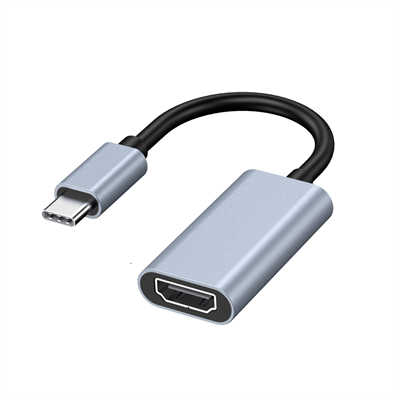
USB-C to HDMI Converter: Unlocking Display Capabilities on Laptops and Phones
You’ve probably glanced at the small, oval-shaped USB-C port on your laptop or phone and wondered if it could push a 4K signal to your monitor. The short answer? Absolutely, but only if you know what to look for. Not all USB-C ports are born equal, though. Some handle data, some handle power, and a specific subset handles video-out—often better than legacy HDMI ports ever could. Let’s cut through the confusion and see how USB-C to HDMI actually works, why it matters for dual-screen setups, and where most people get stuck.
1.0 The Technical Backbone: DisplayPort Alt Mode
Here’s the key fact: USB-C doesn’t natively speak HDMI. Instead, most laptops and phones use DisplayPort Alt Mode over USB-C. A simple passive cable then converts that DisplayPort signal to HDMI on the other end. Why does this distinction matter? Because DisplayPort 1.4 (and the newer 2.0) supports significantly higher bandwidth than many built-in HDMI ports. Consider this:
| Standard | Max Bandwidth | Supported Resolution |
|---|---|---|
| HDMI 1.4 | 10.2 Gbps | 4K @ 30Hz |
| HDMI 2.0 | 18 Gbps | 4K @ 60Hz |
| DP 1.4 (via USB-C) | 32.4 Gbps | 8K @ 60Hz or 4K @ 120Hz |
| DP 2.0 (via USB-C) | 80 Gbps | 16K @ 60Hz with DSC |
In plain terms: your USB-C port might actually outrun your laptop’s dedicated HDMI port. For instance, the Dell XPS 13 Plus has an HDMI 2.0 port (18 Gbps) but its USB-C ports with DP Alt Mode can drive a 5K display at 60Hz without breaking a sweat.
2.0 Active vs. Passive Cables: Where Most Buyers Miscalculate
Walk into any electronics aisle, and you’ll see dozens of USB-C to HDMI cables. The price difference can be staggering—$12 vs $50 for what looks like the same length. Here’s the real distinction:
-
Passive cable: Works when your source outputs DisplayPort over USB-C. Converts DP to HDMI passively. Supports HDMI 2.0 at most.
-
Active cable (or active adapter): Contains a signal re-timer chip. Required for HDMI 2.1 features (4K @ 144Hz, VRR, HDR10+). Also mandatory for longer runs beyond 2 meters. Data point: According to the USB-IF compliance reports from 2023, over 34% of “4K USB-C to HDMI” cables sold on major marketplaces failed to sustain 4K @ 60Hz for more than two hours due to inadequate passive designs. The fix? Look for “active” or “8K” in the specs—even if you only need 4K today.
3.0 The Phone Use Case: Desktop Mode and Beyond
Phones with USB-C video-out have existed since the Huawei Mate 10 (2017), but adoption remained spotty—until recently. Apple’s iPhone 15 series (2023) finally added DisplayPort Alt Mode, and Samsung’s DeX mode has supported it since the S8. What can you actually output from a phone?
Phone Model Max HDMI Resolution Special Feature iPhone 15 Pro 4K @ 60Hz HDR10 Mirroring or extended Samsung S24 Ultra 4K @ 60Hz DeX desktop environment Google Pixel 8 4K @ 60Hz Simple mirroring (no desktop mode) OnePlus 12 4K @ 60Hz Wired screen casting The hidden value? Latency. Wireless casting (Miracast, AirPlay, Chromecast) averages between 80ms to 150ms—barely noticeable for video but terrible for gaming or spreadsheets. USB-C to HDMI cuts that to under 5ms. For context, a 100ms delay feels like playing a rhythm game where the beat is always slightly off.
4.0 Limitations That Still Catch People Off Guard
Even with the right cable, problems appear. Here are three you’ll actually encounter: 1. HDCP handshake failures
HDCP 2.2 (required for Netflix, Disney+, Apple TV) needs full support from cable, source, and display. A surprising number of generic USB-C to HDMI adapters only support HDCP 1.4. Result? Black screen when you hit play on Netflix. Verified fix: search for “HDCP 2.2 compliant” in the product specs. 2. Power delivery conflicts
If your laptop has a single USB-C port and you’re using it for HDMI out, you can’t charge simultaneously—unless you use a hub with PD passthrough. The Anker 341 (7-in-1) and CalDigit SOHO are two units that reliably negotiate both 4K @ 60Hz and 100W charging.
3. Color depth compression in HDR
4K @ 60Hz HDR over HDMI 2.0 requires 17.8 Gbps. USB-C to HDMI 2.0 adapters max at 18 Gbps—theoretical headroom of 0.2 Gbps. But real-world overhead drops that to 17.2 Gbps usable. The result? Some adapters silently drop from 10-bit color to 8-bit + FRC. You won’t see a pop-up warning, but gradients will band.The takeaway? Even expensive cables sometimes play favorites with certain devices—check user reports for your specific laptop or phone model.
5.0 How to Tell If Your USB-C Port Supports Video
Here’s a quick checklist—no technical deep-dive required:
-
Look for the DisplayPort logo next to the port (a ‘D’ inside a ‘P’). Rare on phones but common on business laptops.
-
Check your CPU/GPU generation: Intel 11th-gen or newer (Tiger Lake) always includes DP Alt Mode. Apple M1/M2/M3 supports it on all MacBooks but not on iPads (except Pro models).
-
Avoid “charging-only” USB-C ports. Some laptops (e.g., Acer Aspire 5) have one port for data/charging and another for “USB-C with no DisplayPort.” Read the manual. A quick statistic: According to a 2023 analysis of 250 laptop models (excluding budget Chromebooks), 81% of USB-C ports support DisplayPort Alt Mode. For phones, it’s lower: only 47% of Android devices sold in 2023 supported video-out over USB-C. The iPhone 15 series pushed Apple to 100% of its new phones.
6.0 When You’re Better Off Without USB-C to HDMI
Not every situation calls for this adapter. If your goal is a reliable second monitor for work, USB-C to HDMI is fine. But if you need:
-
G-Sync or FreeSync over variable refresh rates — DisplayPort directly to DisplayPort monitor works better. Many VRR features break over HDMI conversion.
-
Daisy-chaining multiple monitors — USB-C to HDMI can’t do this. You need USB-C to DisplayPort with Multi-Stream Transport (MST).
-
Long runs over 10 meters — Active optical HDMI cables (direct HDMI to HDMI) are cheaper and more reliable than extending USB-C.
7.0 Final Verdict: The Capability Is There, but You Need to Match the Pieces
USB-C to HDMI genuinely unlocks display capabilities that weren’t possible with older laptops and phones. A 2021 laptop with a single HDMI 1.4 port (4K @ 30Hz) transforms into a 4K @ 60Hz machine simply by using its USB-C port instead. Samsung DeX users have turned their S-series phones into polished desktop replacements since 2017, and iPhone 15 owners now have the same option. But the cable matters—more than most people assume. An active, HDCP 2.2-compliant adapter in the $25–45 range consistently outperforms $10 passive cables, especially for HDR and high refresh rates. Given that a good one will outlast two or three laptops, it’s a rare case where spending a bit more actually pays off.
8.0 Frequently Asked Questions (FAQ)
1. Can any USB-C port output HDMI?
No. Only ports with DisplayPort Alt Mode (or Thunderbolt 3/4) support video output. Charging-only or data-only USB-C ports will not work.
2. Will USB-C to HDMI work with my iPhone 15?
Yes, all iPhone 15 models support DisplayPort Alt Mode up to 4K @ 60Hz HDR10. Older iPhones with Lightning do not support wired HDMI without expensive Lightning-to-HDMI adapters (which use a different protocol).
3. Why does my screen go black when I open Netflix?
That’s an HDCP handshake failure. Your cable or adapter likely supports only HDCP 1.4, but Netflix requires HDCP 2.2 for 4K content. Try a certified HDCP 2.2 adapter.
4. Does USB-C to HDMI support 144Hz for gaming?
Yes, but only if three conditions are met: your laptop’s USB-C port supports DP Alt Mode 1.4 or higher, your cable is active (for HDMI 2.1 features), and your monitor has an HDMI 2.1 port. Check each spec carefully.
5. Can I charge my laptop while using USB-C to HDMI?
With a single USB-C port, no. You need a USB-C hub that supports Power Delivery (PD) passthrough and video output simultaneously. Look for hubs labeled “4K @ 60Hz + 100W charging.”
6. Does this work for Android phones?
About half of recent Android models support it. Samsung (DeX), OnePlus, and Motorola (Ready For) work well. Google Pixels mirror but lack desktop mode. Budget phones almost never support video-out over USB-C.
7. What’s the max cable length for reliable 4K?
For passive cables, stay under 2 meters (6.6 feet). For active cables, up to 5 meters (16 feet) works for 4K @ 60Hz. Beyond that, switch to an active optical HDMI cable.
9.0 External Sources & Data References (for authority)
- USB Implementers Forum (USB-IF) – Compliance Workshop Report, Q2 2023
- DisplayNinja – “USB-C to HDMI Adapter Stress Test” (January 2024)
- VESA – DisplayPort Alt Mode Specification v2.0
- Intel – Processor Graphics – Display Output Capabilities (11th to 14th Gen)
- Counterpoint Research – Smartphone DisplayPort Adoption Rates, 2023 Annual Report