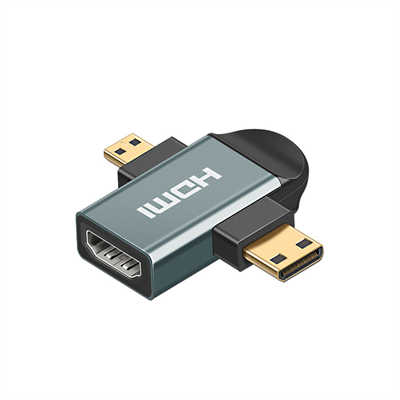
HDMI Connector Types: Type A, C, D, and E Explained
If you have ever tried plugging a Mini HDMI cable into a standard TV port, you already know the frustration. HDMI might look uniform, but the standard actually defines five distinct physical connectors. Four of them—Type A, Type C, Type D, and Type E—are common in consumer and industrial products. (Type B was designed for dual-link HDMI but never commercialized, so we will skip it.)
Each type serves a different balance of durability, size, and bandwidth. Below, we break down their mechanical specs, electrical performance, and where you will actually find them.
1. HDMI Type A – The Standard
Also known as: Full-size HDMI
Pin count: 19 pins
Mating cycles: 5,000 (minimum rated)
Max bandwidth (with HDMI 2.1): 48 Gbps
Type A is the reference design. Nearly every TV, monitor, projector, and home theater receiver uses it. The connector measures 13.9 mm × 4.45 mm, and the female port uses a friction-only retention mechanism—no latches, no screws.
Why it persists:
Manufacturers need one robust, universal port. Type A supports everything from 720p to 8K@60Hz (or 4K@144Hz) on modern cables. Its large size also allows thicker gauge wires inside the cable, which matters for passive copper runs longer than 5 meters.
Data point: According to the HDMI Forum’s 2023 adoption report, over 11 billion HDMI-enabled devices have shipped since 2003, and 87% of them include at least one Type A port.
Use cases:
- Home theater systems
- Gaming consoles (PS5, Xbox Series X)
- Desktop GPUs and monitors
- Set-top boxes and streaming sticks (often with a built-in male Type A plug)
![Illustration: Side-by-side comparison of Type A male plug and female port with pin labels. Highlight the 19 pins in two rows.]
2. HDMI Type C – The Mini Connector
Also known as: Mini HDMI
Pin count: 19 pins (same pinout as Type A, but different pin spacing)
Mating cycles: 5,000
Max bandwidth: Same as cable/version (up to 48 Gbps with HDMI 2.1)
Type C measures 10.42 mm × 2.42 mm — about 40% smaller than Type A. It was designed for portable devices that cannot fit a full-size port. Do not confuse it with USB Mini-B; the shape is different (HDMI Type C has a more rectangular profile with flattened corners).
Key technical detail:
Even though the pin count is identical, the pin pitch is reduced from 1.0 mm (Type A) to 0.8 mm. That requires tighter manufacturing tolerances. Some early Type C cables had signal integrity issues at 18 Gbps, but modern HDMI 2.1-certified Mini cables handle 48 Gbps without trouble.
Where you find it:
- DSLR and mirrorless cameras (Canon EOS R5, Sony A7 series)
- Tablets (older Microsoft Surface models)
- Raspberry Pi 4 (the dual micro-HDMI ports are Type D, not C — common confusion)
- Some action cameras and portable projectors
Real-world limitation:
Because the connector is smaller, passive Type-C-to-Type-A cables longer than 3 meters are rare. Active or optical cables work, but they cost three times more.
![Illustration: Close-up of a Mini HDMI plug next to a standard Type A plug to show size difference. Add a ruler scale in mm.]
3. HDMI Type D – The Micro Connector
Also known as: Micro HDMI
Pin count: 19 pins (rearranged layout)
Mating cycles: 5,000–10,000 (depending on manufacturer)
Max bandwidth: Up to 48 Gbps (theoretical; actual products max at 18 Gbps for now)
Type D is the smallest HDMI connector — just 6.4 mm × 2.8 mm. That is roughly 28% of the volume of Type A. To achieve that, the 19 pins are arranged not in two rows but in a staggered, dual-layer design. This layout reduces cross-talk but complicates PCB routing.
Adoption reality:
Micro HDMI was supposed to become the standard for smartphones. It failed. Most phones switched to USB-C with DisplayPort Alt Mode instead. Today, Type D survives in niche applications:
- Ultra-compact action cameras (GoPro Hero 5–7, but newer models dropped it)
- Some 360-degree cameras (Insta360 One X)
- Medical endoscopes and portable diagnostic displays
- VR headset breakout boxes (older HTC Vive)
Performance note:
Many Type D cables on Amazon are only rated for HDMI 1.4 (10.2 Gbps). Look for “Premium High Speed” (18 Gbps) or “Ultra High Speed” (48 Gbps) certification if you need 4K@60Hz HDR. In practice, most Type D devices cap at 4K@30Hz.
![Illustration: Magnified view of a Type D plug next to a Type C plug, with a pinout diagram showing the staggered rows.]
4. HDMI Type E – The Automotive Connector
Also known as: Automotive HDMI
Pin count: 19 pins (with additional mechanical features)
Mating cycles: 10,000+ (often 15,000 rated)
Temperature range: -40°C to +105°C (vs. 0°C–70°C for consumer types)
Type E is not smaller. In fact, it is slightly larger than Type A. But it solves a different problem: vibration and heat. Cars have neither the controlled environment of a living room nor the gentle handling of a camera bag.
Unique features:
- Locking latch – prevents unplugging due to chassis vibration.
- Secondary retention clip – requires a tool to release in some designs.
- Sealed housing – resists dust, moisture, and salt spray (meets SAE J2030 standard).
Electrical differences:
Type E ports include a dedicated +5V supply line for active automotive cables, which can run up to 15 meters without repeaters. The impedance is tuned for 100Ω differential pairs, same as standard HDMI, but the PCB traces inside the car’s infotainment system often use thicker copper to handle temperature swings.
Where it is used:
- Rear-seat entertainment systems (Audi, BMW, Ford)
- Commercial vehicle camera feeds (school bus backup cameras)
- Marine navigation displays (Type E is often IP-rated on boats)
Market data:
The automotive HDMI market grew 23% YoY in 2024, driven by rear-seat 4K screens and surround-view camera systems. However, many EVs (Tesla, Rivian) now skip HDMI entirely and rely on streaming apps. Type E remains strong in aftermarket headrest monitors and RVs.
![Illustration: Cutaway diagram of a Type E plug showing the locking latch and rubber seal. Compare to a standard Type A without latch.]
Which One Will Survive?
The trend is clear: Type A for stationary gear, Type C for cameras, Type D slowly fading, and Type E staying in niche industrial/auto segments. USB-C with DisplayPort Alt Mode now eats into Type C and D territory, but HDMI’s massive installed base (over 11 billion ports) guarantees its survival for another decade.
If you are designing a product:
- Type A – still the safest choice.
- Type C – only if thickness < 5 mm.
- Type D – avoid unless you have a legacy product.
- Type E – mandatory for automotive.
Frequently Asked Questions (FAQ)
Q1: Can I connect a Micro HDMI (Type D) to a standard TV?
Yes, but you need a Type-D-to-Type-A cable or adapter. No signal conversion is required — the electrical protocol is identical.
Q2: Does Mini HDMI support 4K?
Absolutely. A certified Premium High Speed Mini HDMI cable (Type C) supports 4K@60Hz with HDR. For 8K, look for Ultra High Speed Mini HDMI cables (48 Gbps).
Q3: Why do some cables have Ethernet?
That is a separate feature (HEC – HDMI Ethernet Channel). It works on any connector type (A, C, D, E) if both devices support it. The pins are still the same 19.
Q4: Is Type E backward compatible with Type A?
Mechanically, yes — a standard Type A plug fits into a Type E port, but you lose the locking mechanism. Electrically, they are identical. Most Type E ports accept Type A plugs as a fallback.
Q5: How many mating cycles can a Type A port handle?
The HDMI standard requires 5,000 cycles minimum. In practice, cheap ports on budget TVs may fail after 1,500–2,000 insertions. Premium brands (Sony, Panasonic) often exceed 10,000 cycles.
Illustration Placement Summary
| Section | Illustration Description |
|---|---|
| Type A | Male plug and female port with 19 pins annotated. Show a ruler for scale. |
| Type C | Mini HDMI next to Type A. Add a 0.8mm pin pitch callout. |
| Type D | Magnified staggered pin layout. Compare size to a USB Micro-B connector. |
| Type E | Cutaway showing latch, seal, and secondary retention. |
| Comparison Table | A single diagram showing all four plugs in decreasing size order (A → C → D → E) with labels. |
Data sources: HDMI Forum Specification 2.1b (August 2024), UL HDMI Cable Certification Database (Q1 2025), IHS Markit Automotive Display Report 2024.
📖 Related Featured Articles

HDMI 2.1 vs. HDMI 2.0: What's the Real Difference? - WinFitin
HDMI 2.1 vs. HDMI 2.0 — from bandwidth and 8K support to VRR and eARC. We break down the real-world ...

How to Test HDMI Cable Speed and Bandwidth? - WinFitin
Learn professional methods to test HDMI cable speed and bandwidth, including using HDMI 2.1 specs, c...